
You know the readiness list on a scan tool: Catalyst, EVAP, Misfire, and the other familiar “monitors.” What changes when you can look inside one of those entries and see which individual tests are still unfinished?
October 21, 2026
The entries you commonly call “readiness monitors” are group-level indicators. Each can summarize several individual diagnostic tests. EVAP, for example, can involve checks for leaks and purge flow. An “EVAP: Not ready” result does not tell you which of those tests remains unfinished.
The familiar entries and the newer OBDonUDS entries are both readiness groups. SAE J1979-2 OBDonUDS expands and reorganizes the categories. Its bigger practical improvement is a standardized way to look inside a group and retrieve the status of its individual tests.
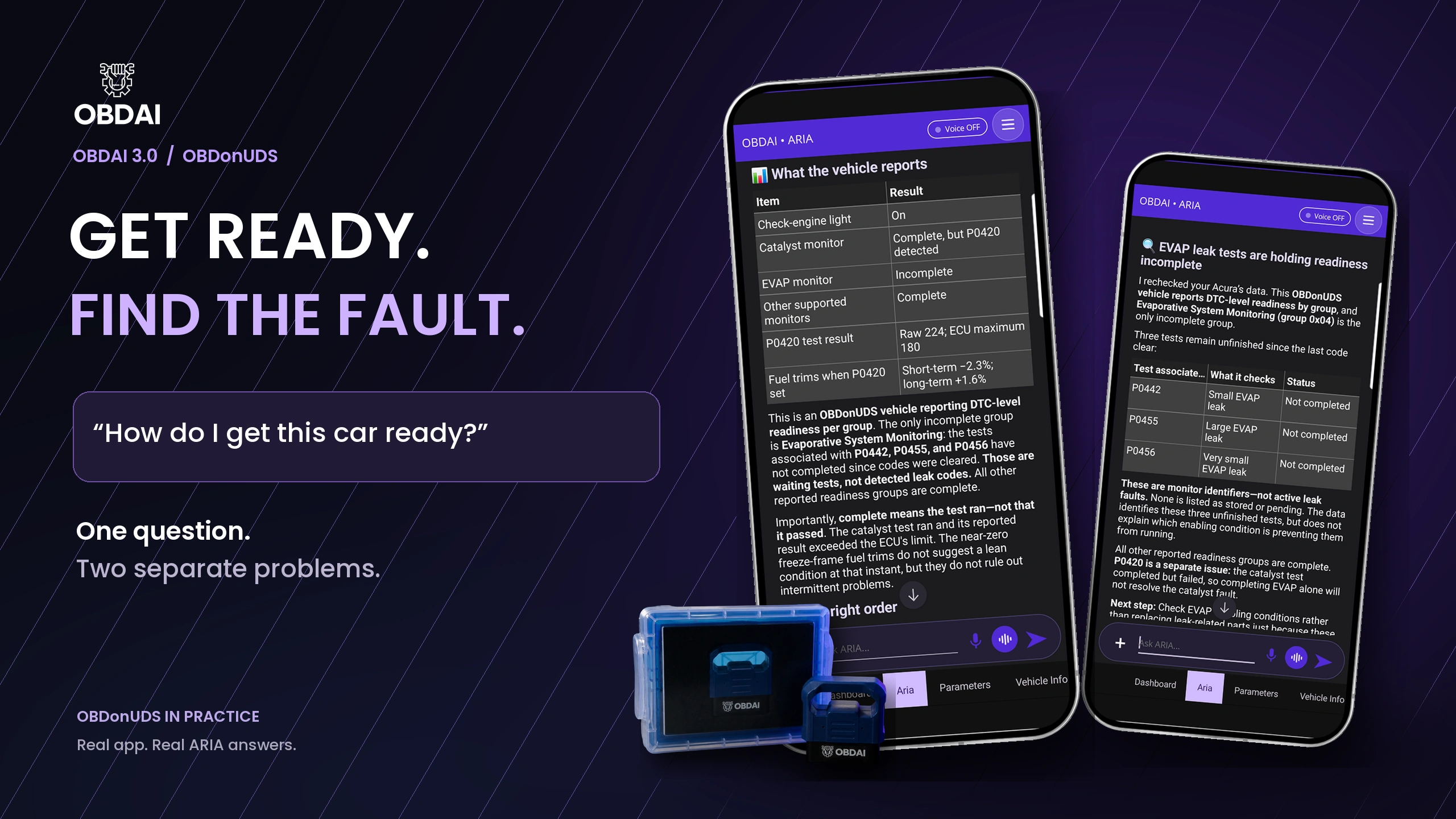
In our recorded demonstration, the EVAP group is incomplete. Looking inside identifies three unfinished tests: the checks associated with P0442, P0455, and P0456. These are the tests for small, large, and very small EVAP leaks. Their identifiers are not evidence that those leaks have been detected.
Now you have a more focused next step: find the conditions those checks need, see whether the vehicle can meet them, and investigate anything preventing them from running. In this demonstration all three tests are unfinished; the data does not single out one of them or identify the missing enable condition.
That extra evidence can change the next step in a diagnosis, especially when you are preparing a vehicle for an emissions inspection or checking whether a repair worked.
ARIA identifies two separate issues in this session: the unfinished EVAP checks and a catalyst test that has completed but failed. The catalyst record reports a raw test value of 224 against an ECU maximum of 180, with P0420 present. More driving merely to complete EVAP will not address that catalyst fault.
Readiness tells you whether the relevant self-checks have completed under the applicable rules. It is not a blanket declaration that the system is healthy. That distinction is why the fault status and test records belong alongside the readiness summary.
CARB’s development material identifies a practical repair problem: an incomplete group does not identify its unfinished monitors. The proposed remedy linked group membership to individual DTC status, which technicians could use with factory enable criteria. Its test-result proposal also addressed the difficulty of connecting manufacturer-defined test IDs to specific faults. CARB workshop, slides 14–17.
The later rulemaking rationale explains the broader aim: more meaningful readiness, more useful failure snapshots, and better data for repairs and inspection programs. It also describes monitor-activity data as a way to reveal recent behavior that a long-term average can obscure. CARB’s 2021 rationale, printed pages 5, 10–12, 21–26, and 30.
The result is a standardized way to retrieve more of the vehicle’s own diagnostic evidence. A shop does not gain the benefit merely by buying a tool with a “UDS” badge. The tool has to request the relevant information and make it usable.
The technical detail explains how the tool looks inside. One incomplete group does not identify one failed part.
J1979-2 provides a group lookup that returns the associated DTC identifiers and their individual status. The identifier tells you which fault the monitor is designed to detect. The status tells you whether that test has completed or detected a failure.
A DTC listed under a readiness group is not automatically an active fault. It can identify a monitor that has not yet completed. Treating every identifier as a stored failure would turn useful readiness evidence into a misleading diagnosis.
The status can distinguish a test not completed since codes were cleared, a test not completed during the current operation cycle, a detected failure, a pending DTC, and a confirmed DTC. These are different facts. Reading them together helps explain what the vehicle has—and has not—established.
Without that detail, you may know that a group is incomplete but lack a standardized way to identify the monitor keeping it there.
The information supports a focused repair workflow:
The improvement is a smaller, better-defined question. You can investigate a particular unfinished monitor instead of repeating a general drive cycle without knowing which test remains.
The protocol does not supply every manufacturer’s drive-cycle instructions or reveal every reason a monitor was inhibited. Service information and physical diagnosis remain part of the job. California BAR notes that some monitors will not complete until an enabling component problem is diagnosed and repaired. BAR OBD Test Reference, readiness standards.
Classic OBD already provides valuable monitor-test results through Mode $06. OBDonUDS adds a DTC-based way to retrieve test records, with supported results containing a measured value, limits, and unit/scaling information.
That association matters: it connects the test evidence to the fault the monitor is designed to detect. A properly interpreted result can help distinguish a passing test, a failure, and a completed test whose value lies near a limit.
A near-limit result is a reason to investigate in context, not a forecast that a component will definitely fail. The test must have run, the units and limits must be interpreted correctly, and the result must be relevant to the symptom.
Without the fault-specific record, a tool may show other test data or a code list while leaving this direct connection between monitor, fault, and result unavailable.
A fault that happened under load may disappear when the vehicle is idling in the bay. Current readings alone do not recreate the event.
J1979-2 supports first- and latest-occurrence snapshots for multiple DTCs. Depending on the vehicle and the records available, those snapshots let you compare operating conditions at different occurrences and across faults. You can use them to plan a relevant reproduction test and compare its evidence with the original event.
For example, a technician investigating an intermittent complaint can ask whether the fault was captured cold or warm, at low or high load, and whether the latest occurrence resembles the first. Those questions are more useful than assuming the vehicle’s present behavior explains an earlier failure.
Without the snapshots, you lose recorded conditions that may be difficult or time-consuming to reproduce by trial and error.
“No fault found” means something different when the relevant test runs frequently than when it rarely completes.
Supported DTC-based in-use performance records describe monitor completions and qualifying operating opportunities. Supplemental monitor-activity records provide another view of execution over vehicle operation. These measures describe monitoring activity; they are not component health scores.
Used with readiness and fault status, they help frame the next question: is the evidence based on a test that has actually been exercising the system, or is a missing opportunity part of what needs investigating?
They do not prove a part is faulty or identify a specific missing enable condition by themselves. Without them, however, you have less context for judging how much confidence to place in the absence of a reported failure.
| Evidence available | What it helps you investigate | What you lose without it |
|---|---|---|
| Readiness-group membership and individual status | Which monitor remains unfinished, and whether a listed identifier represents a failure | You may be left with only a broad group-level result |
| DTC-based test records | The result and limits associated with a particular fault monitor | Less direct evidence connecting the test to the problem |
| First/latest fault snapshots | The conditions needed to reproduce an intermittent event | More reliance on the symptom description and trial-and-error reproduction |
| Monitor performance and activity records | Whether monitoring has been completing during vehicle operation | Less context for interpreting “no fault found” |
None of these records replaces a technician’s judgment. Together, they can make that judgment better informed—and help explain to a customer why the next test or additional vehicle operation is necessary.
Connect the supported vehicle, let OBDAI collect its diagnostic evidence, and ask:
“How do I get this car ready?”
Or start with, “Help me fix this check-engine light.”
You do not need to know the terminology to use this information. You do not have to know what a readiness group is, name an extended record, or work out which technical question to ask. Tell ARIA the problem or what you want to accomplish. She understands the diagnostic concepts, can retrieve the relevant captured evidence, and can guide you through what to check next.
The technical detail in this article is here for readers who want to understand the evidence. It is not a vocabulary test you need to pass before ARIA can help. Tell her about any repair or driving you have done that she would not already know about.
The web dashboard also has an Extended DTC Data panel. You can examine the records there, or ask ARIA to retrieve and explain the captured readiness-group and extended fault evidence. You do not need to find the panel, know a record name, or interpret its fields before she can help. A dedicated screen for every data type is a product design choice; access through ARIA does not depend on one.
You can simply ask:
If you already know what you want to examine, you can be more specific: “Which test is holding readiness incomplete?” or “What do the fault snapshots show?” Those are optional ways to explore the evidence, not questions you need to know in advance.
Ask naturally. ARIA can work through the available evidence with you and explain what still needs checking.
OBDAI requests readiness-group and supported extended records during connection and makes the captured evidence available to ARIA. Ask about the session being examined; a previously captured status is not a continuously refreshed readiness display. Reconnect to collect a fresh set of these supplemental records after further operation or repair.
OBDAI 3.0 uses native F501 readiness when usable F401 data is unavailable, and missing readiness does not stop the other diagnostics. Its ARIA workflows also support choosing readings and reviewing a recorded drive second by second. Premium and PRO include timed reading selections, check-ins, and watches while the app stays open and connected.
OBDonUDS requires GEN2, PRO, and a compatible vehicle. Individual records depend on the vehicle. In the captured answer, ARIA compares the raw DTC-based result with the ECU’s raw limit; those numbers are not automatically a measurement in volts, seconds, or a percentage of converter efficiency. Interpretation depends on the test definition and its unit/scaling information.
The useful outcome is a vehicle whose relevant diagnostics have run and whose repair is supported by evidence. “No codes” alone does not establish that. An incomplete monitor alone does not prove a failed component, either.
OBDonUDS gives you more ways to tell the difference: identify the test, examine its status, retrieve the records it supports, and check fresh evidence after the repair or required operation.
Official inspection eligibility and pass/fail decisions still follow the applicable program’s rules and equipment. OBDAI helps with diagnosis and preparation; reading this information is not an official inspection or a guarantee of passing.
Read the companion article: The New Cars Your Scan Tool Cannot Test. For the current product requirements, see GEN2 + PRO.
