
TL;DR: OBDAI PRO generates branded professional repair estimates — with real parts pricing, labor breakdowns, maintenance schedules, and a signature line — from the same scan you’re already doing. One signed estimate covers your entire year of PRO. Everything after that is yours.
Here’s the uncomfortable math.
You’re already doing the work. You’re plugging in, reading codes, pulling live data, explaining what’s wrong. Maybe you’re doing it for free as a courtesy. Maybe you’re charging $50-75 for a diagnostic. Either way, the customer walks out with a verbal summary and calls someone else for a second opinion — because you gave them nothing to hold.
I built OBDAI PRO to fix that.
PRO doesn’t change what you do. It changes what you deliver. Same scan. Same diagnostic. But now there’s a document at the end — with your name on it, your logo, itemized repairs, manufacturer maintenance, and a line at the bottom where the customer signs.
That’s not a scan anymore. That’s a sale.
Here’s exactly how it works.
Plug in. Connect. Run the diagnostic — stationary or drive test with ARIA. Tap Disconnect when done.
You already do this.
Every sensor reading, every trouble code, every readiness monitor — OBDAI captures it all and syncs it to the cloud. When you’re done, the session is waiting for you on the web dashboard at dashboard.obdai.app.
This is where PRO earns its money.
Open the dashboard. Find the vehicle. Click Estimate Report. Now you’re looking at something no other OBD2 tool on the market gives you:
 Four report types. Estimate Report turns your scan into a billable document.
The estimate builder pulls real repair data for that exact year, make, and model:
→ 76+ common repairs with parts and labor pricing
→ Dealer price, independent shop average, or your own custom split
→ Factory maintenance schedule by mileage interval
→ Manufacturer warranty terms
You pick the repairs. You pick the pricing tier. You control the numbers. You control the margin.
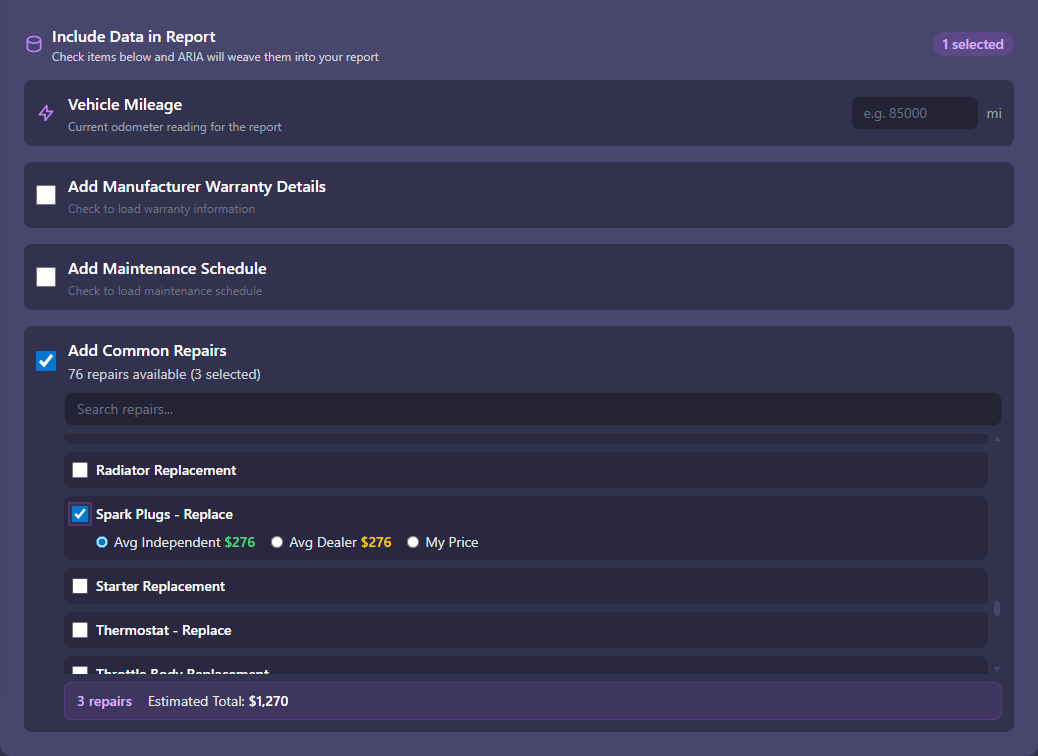 3 repairs selected. Estimated total: $1,270. You pick the price — indie, dealer, or yours.
This data comes from real-world repair cost databases covering thousands of year/make/model combinations. It’s not ChatGPT guessing what a brake job costs. It’s actual parts pricing and labor times that you can present to a customer with confidence.
And here’s the part that matters: you’re not locked into their numbers. See an aftermarket part you source cheaper? Adjust it. Want to add your own labor rate? Go ahead. The estimate is yours — the data just gives you a professional starting point so you’re not pulling numbers out of thin air.
Hit Generate. ARIA produces a branded professional repair estimate:
→ Your shop name, logo, and contact info
→ Itemized repair table with parts, labor, and totals
→ Manufacturer maintenance schedule
→ Warranty notes
→ Subtotals, grand total, customer signature line
It looks like you’re running a $50,000 shop management system. You’re not. You’re running OBDAI PRO.
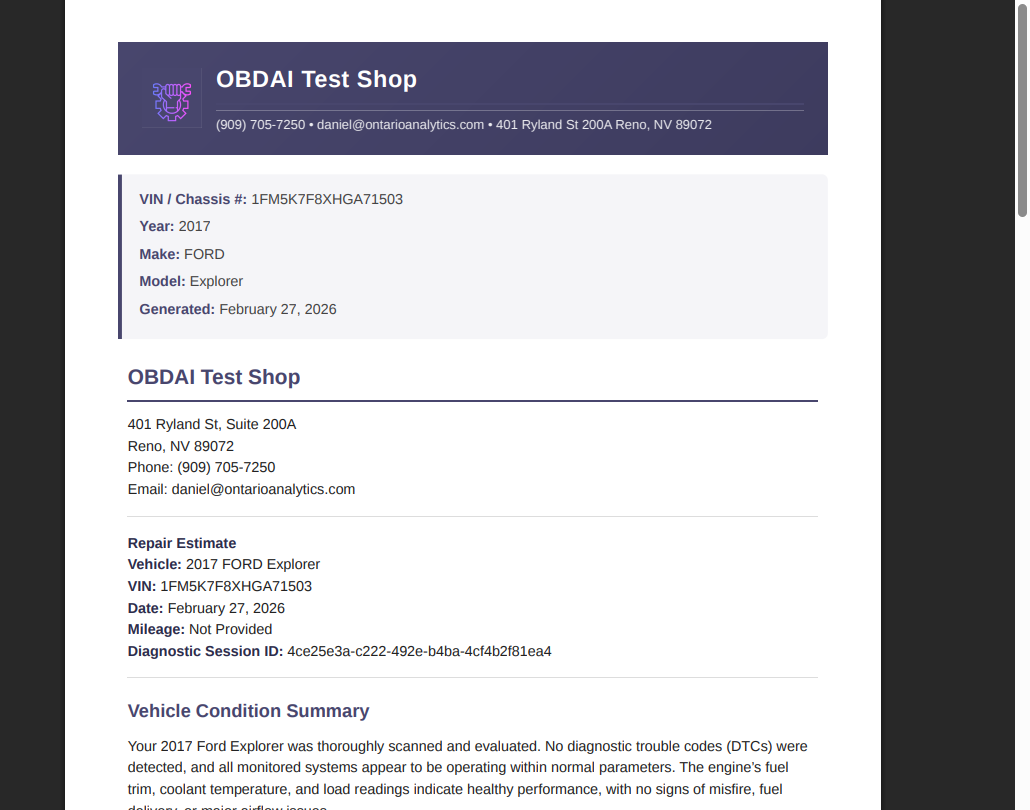
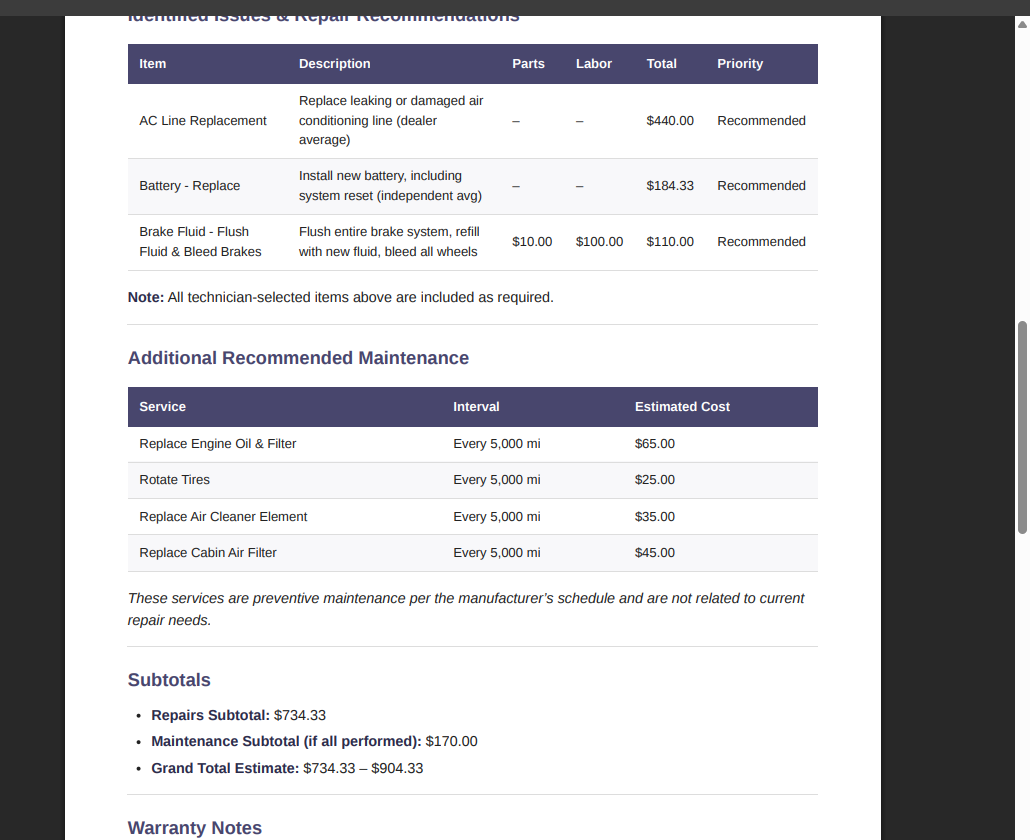 Repairs $734. Maintenance $170. Grand total $734–$904. Signature line at the bottom.
ARIA doesn’t just dump data into a template. She writes the diagnostic narrative — what was found, what it means, what needs to happen — and weaves your selected repairs and pricing into a professional document. The AI actually authored the estimate based on your scan data and the repairs you selected.
Your shop branding goes in once. Settings → Shop Profile → upload your logo, enter your shop name, phone, email, address. Every report you generate from that point forward carries your brand. Not OBDAI’s. Yours.
Hand the customer something real. Not a screenshot. Not a scribble on the back of an invoice. Not “I’ll text you later.”
A document. They read it. They show their spouse. They call you back. They sign. You bill.
One mid-sized repair at normal shop rates covers your entire year of PRO. Everything after that is upside.
Here’s exactly what you do. No guessing.
1. Scan the vehicle with OBDAI. Plug in your dongle, connect in the app, run your diagnostic — stationary or drive test. Talk to ARIA while you’re connected if you want her analyzing live data in real time. When you’re done, tap Disconnect. The session syncs to the cloud automatically.
2. Open the web dashboard. Go to dashboard.obdai.app from any browser — laptop, tablet, your phone. Sign in with the same account you use in the app.
3. Find the vehicle. Click Vehicles in the sidebar. Click the vehicle you just scanned. Scroll down to the ARIA Diagnostic Summary section.
4. Click Estimate Report. You’ll see four colored buttons — Emissions (green), Diagnostic (blue), Pre-Purchase (orange), and Estimate (purple). Click the purple one.
5. Select the scan session. Pick the session you want to base the estimate on. Each one shows the date, DTC count, and MIL status. Click Generate Report.
6. Pick your repairs and pricing. This is the money step. The estimate builder shows 76+ common repairs for that exact year/make/model with real parts and labor pricing. Select what needs to be done. Choose dealer pricing, independent shop average, or enter your own numbers. The total updates as you go.
7. ARIA writes the estimate. The AI generates a full markdown report — diagnostic findings, itemized repairs, maintenance schedule, warranty notes, grand total, signature line. You see it in a two-panel editor: raw markdown on the left, live preview on the right.
8. Edit if you want. Change wording, add notes, remove sections. Or use the AI Refine tool — type something like “add more detail about the P0300 misfire” or “make the summary shorter” and ARIA revises it. The preview updates as you go.
9. Click Finalize Report. The dashboard generates a branded PDF with your shop logo, name, phone, email, and address. Takes a few seconds.
10. Download, print, or email. Hand it to the customer. Done.
The whole thing takes less time than writing a text message about what you found. And the customer is holding a professional document instead of trying to remember what you told them in the parking lot.
Set up your shop branding once in Settings → Shop Profile and every report you generate from that point forward carries your brand automatically.
→ Independent shops
→ Mobile mechanics
→ Used car dealers
→ Pre-purchase inspectors
→ Fleet operators
→ Technicians who want leverage
If you charge for your time, PRO is obvious. If you’re just scanning for fun, Premium has you covered.
The estimate report is the revenue feature. But PRO unlocks the entire professional platform:
Everything in Premium — unlimited ARIA conversations on GPT-5.1, PDF diagnostic reports, cross-device sync, vehicle recall data, diagnostic history and trends.
Plus the business toolkit:
The web dashboard at dashboard.obdai.app is your command center. Every vehicle you’ve ever scanned. Every session. Every report. Searchable, filterable, accessible from any browser. Premium subscribers get read-only access to view their history. PRO subscribers get the full toolkit to generate reports, brand them, and turn scans into revenue.
PRO is $299/year. That’s $24.99/month.
One brake job. One suspension repair. One A/C line replacement. One pre-purchase inspection where the buyer trusts your branded report enough to close the deal.
That’s it. PRO paid for itself. Everything else is margin.
You’ve been scanning cars and explaining codes verbally. You’ve been doing $150 worth of work and charging $75 for it — because without documentation, the customer thinks you just plugged in a little tool and read a screen.
The estimate changes the math. Not because you’re doing more work. Because you’re finally delivering a professional result that matches the work you’ve always been doing.
You can keep scanning. Or you can start closing.
Upgrade to OBDAI PRO — $299/year →
Want to see the estimate workflow before you commit? Daniel walks through the entire process in Part 2 of the OBDAI Tutorial: Web Dashboard & Custom Reports. Scan to signed estimate in under 5 minutes.
Already have OBDAI Premium? Your scan history is already on the dashboard. PRO just unlocks what you can do with it.
Don’t have OBDAI yet? Hardware bundles start at $99.99 — includes the scanner and a year of Premium. Start scanning, start building your diagnostic history, and upgrade to PRO when you’re ready to turn it into a business.
— Daniel
Founder, OBDAI
28 years in OBD-II & I/M
Questions? support@obdai.app — I read everything.
