



Short answer: “Ready” or “Complete” means your vehicle has run that emissions self-test. “Not Ready” means it has not completed it. Readiness alone does not guarantee a smog-test pass: the check-engine light, fault evidence, your vehicle, and your inspection program’s rules also matter.
Start by asking ARIA: “Am I ready for an emissions test, and what still needs attention?” OBDAI gives ARIA the available readiness evidence across responding modules, along with codes, Mode 6 results, freeze frames, drive-cycle counters, live readings, and prior saved sessions where supported. ARIA can explain how those pieces fit together and help you choose the next check.
Need a setup for a supported OBDonUDS vehicle? Explore OBDAI PRO + GEN2, which also includes interactive ARIA on the web. Check compatibility first; classic readiness checking is not exclusive to PRO.
Get an explanation, not just a row of status labels
A catalyst marked “Not Ready” tells you the test is incomplete. It does not tell you whether codes were recently cleared, the engine has not reached the necessary conditions, or another fault is preventing the test. ARIA can look for that context: warm-ups and distance since clearing, coolant temperature and operating behavior, pending codes, fault snapshots, and the vehicle’s own monitor-test measurements.
The useful question is whether the evidence points toward more appropriate driving, a specific diagnostic check, or a repair that still needs verification. ARIA can help distinguish those possibilities and explain what data is missing. It cannot force a monitor to complete or certify an inspection result.
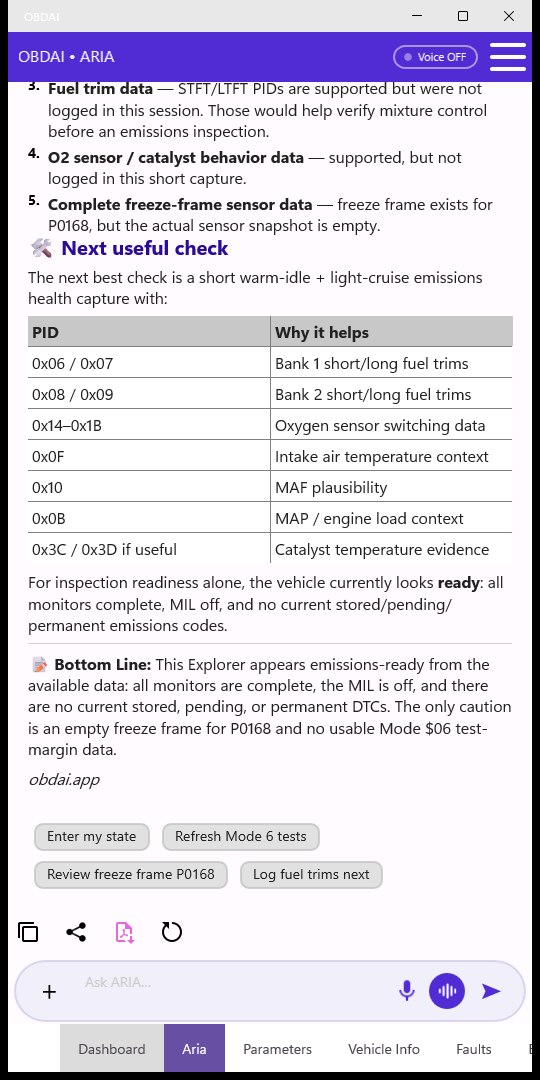
Set up ARIA for this check
Connect an adapter, collect a session, and open ARIA. Tap Emissions Test when offered, or type your question. Tell ARIA your inspection location and any recent repair, battery work, or code clearing so it can put the readings in context.
For supported newer OBDonUDS vehicles, use OBDAI PRO with the GEN2 adapter. PRO also lets you continue the conversation in the web dashboard using saved vehicle evidence. Classic readiness checking is not exclusive to PRO; plan and vehicle support determine the available history and other features.
Get OBDAI PRO + GEN2 · Check compatibility · Compare plans
What the readiness labels mean
Readiness monitors are the vehicle’s checks of emissions-related systems. A monitor generally needs specified operating conditions before it can finish. Some run frequently during operation; others need a particular temperature, load, fuel level, or soak period.
| Status | What you can conclude |
|---|---|
| Ready / Complete | The monitor has completed. Check MIL and trouble-code evidence separately; completion is not proof that the vehicle is fault-free. |
| Not Ready / Incomplete | The test has not completed for the reported readiness period. This is not, by itself, a failed component. |
| Not Supported | That monitor is reported as unsupported. This is different from incomplete, and does not by itself mean a fault or a missing part. |
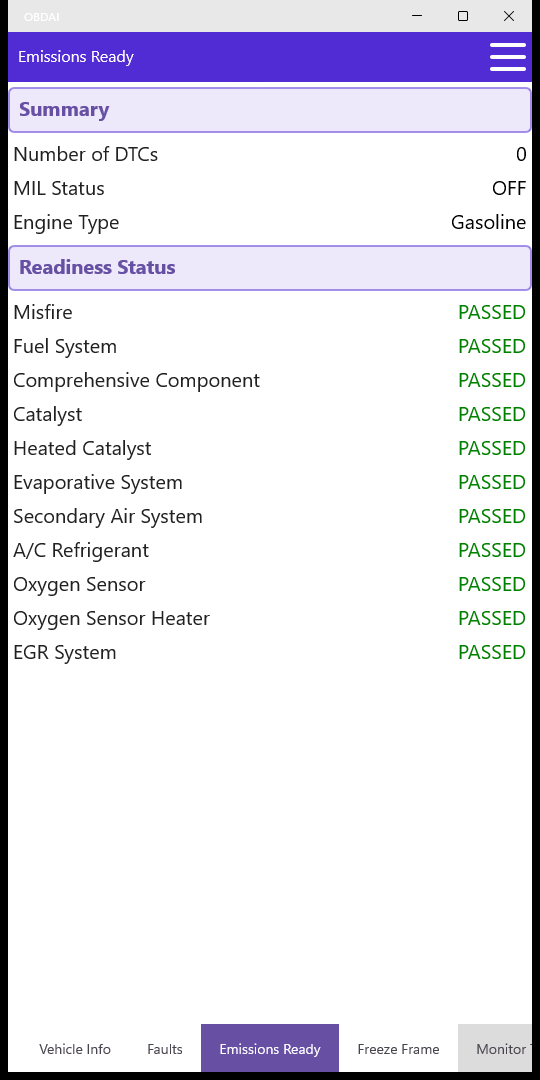
OBDAI’s classic Emissions screen uses the label PASSED for a completed readiness monitor. Read that as monitor completion, not a promise to pass the state’s inspection. The “since codes cleared” status and “this drive cycle” status also describe different periods; one can be complete while the other is not.
Readiness across modules matters
OBDAI combines supported readiness across responding emissions-related modules. ARIA can consider faults and live evidence from those modules too, rather than assuming one controller’s result describes the whole vehicle. “All responding modules” means those that return supported diagnostic evidence, not every electronic module installed in the car.
On supported vehicles, OBDAI 2.7 PRO + GEN2 also reads SAE J1979-2 / OBDonUDS readiness by monitor group, associated fault status, extended records, snapshots, and live data. ARIA can use these together to explain an incomplete group or a conflict in the reported evidence. OBDonUDS is a different diagnostic protocol; a classic-only adapter workflow is not sufficient. See what data OBDAI can read for the capability map and boundaries.
A practical workflow before your smog appointment
- Save the starting evidence. Connect before clearing anything. Ask ARIA to review readiness, stored/pending/permanent codes, and MIL status. Mention your symptoms and recent work.
- Investigate what has not completed. Ask: “What evidence explains the incomplete monitor?” ARIA can inspect available Mode 6 results, freeze frames, live readings and counters. A low distance or warm-up count since clearing can explain why a clean code list is still unproven.
- Choose the appropriate next step. Address faults that may block testing, or follow verified vehicle-specific drive-cycle guidance when the evidence supports that. A fixed number of miles or a generic highway routine does not guarantee completion.
- Recheck and compare. After the drive or repair, collect another session and refresh Monitor Tests if needed. Ask ARIA what changed and which conclusions remain uncertain. History comparison requires available saved sessions and the applicable plan.
- Check the inspection program’s requirements. Use your vehicle’s model year and fuel type. Confirm any permanent-code requirements and vehicle-specific exceptions before the appointment.

Where Mode 6 and freeze frames help
Readiness tells you whether a test completed. Mode 6 adds individual monitor-test measurements and the ECU’s reported limits where supported. ARIA can inspect out-of-range values and compare matching tests across drives. Test identity, units and snapshot age matter; a numerical result alone is not a failed-part verdict.
A freeze frame records operating conditions associated with a stored fault. It can help explain whether the fault occurred during warm-up, at load, or under other recorded conditions. Live readings describe the current session; they do not automatically reproduce the conditions when the fault set. ARIA can relate these different views instead of asking you to reconcile them manually.
Inspect the raw readiness evidence yourself
Open Emissions to see supported monitors, MIL status, and the reported DTC count. Use the fault-code view for the code lists and available freeze frames, and Monitor Tests for the vehicle’s self-test measurements. These views support the explanation and let you check its inputs.
How many incomplete monitors are allowed?
There is no single allowance to apply to every car and every inspection program. Requirements depend on jurisdiction, model year, fuel type, and sometimes vehicle-specific test exceptions. OBDAI’s combined readiness result is not a state-specific inspection decision.
California example — checked September 10, 2026
The California Bureau of Automotive Repair’s current OBD Test Reference lists these allowances for the OBD portion of a Smog Check:
| Vehicle | Monitors that may remain incomplete |
|---|---|
| Gas, 1996–1999 | Any one, subject to the reference’s continuous-monitor treatment. |
| Gas, 2000 and newer | EVAP only, subject to the reference’s continuous-monitor treatment. |
| Diesel, 1998–2006 | None. |
| Diesel, 2007 and newer | DPF and NMHC catalyst only. |
BAR ignores misfire, fuel and comprehensive-component continuous monitors during the gas-vehicle OBD test. Its reference also contains vehicle-specific exceptions, MIL checks, communication requirements and permanent-code standards. Check the current BAR OBD Test Reference for the applicable vehicle and complete rules.
BAR’s October 2025 regulation change should not be read as proof that every previously allowed incomplete monitor now fails. BAR described a gradual, data-driven implementation; the current test reference is the practical source to consult. See BAR’s explanation of the readiness changes.
For other locations, use your state or local emissions program’s current guidance rather than applying California’s table. Readiness is only one part of the inspection.
Why a monitor stays Not Ready
Recent clearing or loss of learned state. Clearing emissions codes resets readiness and removes diagnostic evidence. Battery disconnection or module work can also reset it, depending on the vehicle. Do not clear codes merely to prepare for inspection; the vehicle needs to run its checks again.
The enabling conditions have not occurred. EVAP checks may require a suitable fuel level, temperature and soak period. Catalyst and oxygen-sensor checks need their own operating conditions. There is no universal speed, time, temperature or mileage recipe for all vehicles.
A fault is blocking the test. An engine that fails to warm correctly, a relevant sensor problem, or another emissions fault can prevent a monitor from completing. Repeatedly driving without diagnosing the blocker may accomplish nothing.
Ask ARIA to connect the incomplete monitor to the data it can actually see and locate vehicle-specific service information when needed. Confirm the applicable procedure; do not treat an AI-generated drive cycle as guaranteed manufacturer guidance. If a procedure cannot be performed safely and legally in traffic, a qualified repair facility can advise on alternatives.
Which systems do the monitors cover?
| Monitor family | What it evaluates, where equipped |
|---|---|
| Misfire, fuel system, comprehensive components | Combustion irregularities, fuel control, and emissions-related component operation. |
| Catalyst / heated catalyst | Catalyst-system operation and efficiency. |
| EVAP | Fuel-vapor containment and related system operation. |
| Oxygen sensor / sensor heater | Oxygen-sensor response and heater operation. |
| Secondary air | Emissions air-injection system operation. Not Supported can be normal for an unequipped vehicle. |
| EGR / VVT | Applicable recirculation or valve-control monitoring. |
| Diesel NMHC, NOx/SCR, boost, exhaust sensors and DPF | Applicable diesel aftertreatment, air-handling, sensor and filter systems. |
What about permanent codes?
Permanent emissions codes are separate from stored and pending codes. A scan tool cannot simply erase them. After a repair, the vehicle must satisfy its own diagnostic criteria before removing them. A clean stored-code list and a completed monitor do not automatically mean the permanent-code list is empty.
Some inspection programs evaluate permanent codes separately and apply specific vehicle or operating-history exceptions. For California, consult the permanent-DTC section of the BAR OBD Test Reference; do not assume that every permanent code automatically fails every vehicle.
Before you go
Ask ARIA to summarize the latest evidence, confirm which required monitors remain incomplete, and flag codes or missing data that still need attention. Recheck your inspection program’s rules and retain the session so you can compare it if further work is needed.
For the supported OBDonUDS workflow and interactive ARIA on the web, explore OBDAI PRO + GEN2. Already using OBDAI? Start with the Emissions Test question in ARIA.
Related help
- What OBD2 data can OBDAI read?
- How to read and clear trouble codes
- What OBDAI can and cannot diagnose
- Compare Premium and PRO
Questions? support@obdai.app