



ARIA can explain the supported emissions-related diagnostic evidence your vehicle provides to OBDAI: codes from responding modules, freeze frames, readiness, Mode 6 results, live data, vehicle information, counters, and saved sessions where available. It is not unrestricted access to every computer connected to the diagnostic socket.
Start with “What can you see on this vehicle, what is missing, and what does that mean for my symptom?” ARIA can combine evidence, suggest a focused next check, and explain when another tool or a physical inspection is needed. Knowing the boundary is part of a useful answer—not a reason to leave you alone with numbers.
For supported SAE J1979-2 vehicles, OBDAI PRO + GEN2 adds OBDonUDS beta support. Check compatibility before buying; support varies by vehicle, protocol, hardware, and plan.
Ask naturally, then follow the evidence
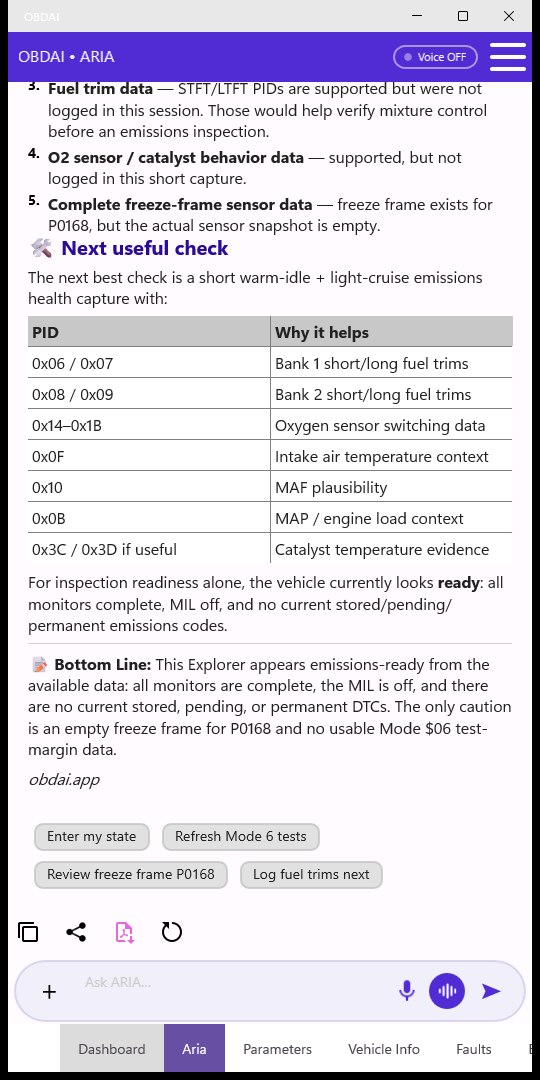
Connect a compatible adapter, collect a session, open Aria, and type into Ask ARIA…. Send with the arrow. Try: “It runs rough when warm. Check the available codes and readings, then tell me what else we need.”
To speak a question and read the answer, leave Voice OFF, tap the microphone, and speak. Speech recognition sends the question when it finishes; ARIA replies as text. Voice ON enables spoken replies. The separate voice-wave conversation button starts repeated listening, answering aloud, and listening again; tap it or the mic to stop. Conversation mode restores your previous voice preference on exit. Allow speech permissions when prompted, and set up or review while safely parked.
Continue in the same conversation: “Why that test?”, “What reading would change your conclusion?”, or “I checked it; here is what I found.” To add a picture, tap +, choose a photo source, review the preview, and send it with a question. Photos can add visible clues but cannot create electronic access to an unsupported module. Remove personal and vehicle identifiers first.
What ARIA can use—and what it tells you
| Evidence, where supported | How ARIA can make it useful |
|---|---|
| Stored, pending, and permanent codes | Explain code status and related faults. A code names a detected condition, not automatically a failed part. |
| Freeze-frame snapshots | Relate a fault to captured temperature, load, speed, and other conditions—not confuse the snapshot with current readings. |
| Readiness across responding modules | Explain incomplete monitors alongside codes, operating conditions, and recent code-clearing context. |
| Mode 6 monitor-test results | Compare measurements with reported limits and comparable prior snapshots. Manufacturer-defined or unsupported tests retain those limits. |
| Live readings and recorded time series | Explain relationships and changes, such as whether both banks’ fuel trims move together or a symptom occurs under a particular load. |
| Vehicle identity and counters | Use available VIN/calibration/ECU information and since-clear or in-use counters to put results and their maturity in context. |
| Saved vehicle sessions | Compare before/after or earlier/later evidence when the relevant history is available to the account and plan. |
“Responding modules” means controllers that actually return supported evidence, not every installed module. A transmission may report an emissions-related code through a supported path without exposing all its manufacturer-specific functions.
For the Services 01–0A map, PID-count explanation, and protocol details, see What OBD2 data can OBDAI read?.
Newer OBDonUDS vehicles: the same conversation, a different protocol
SAE J1979-2 / OBDonUDS carries standardized emissions diagnostics over UDS rather than the classic OBD service path. OBDAI 2.7’s beta support requires PRO and GEN2 on a supported vehicle. It includes readiness by monitor group, fault status, supported snapshots and extended records, vehicle information, live data, and mapped monitor-test evidence where available.
Ask: “Explain the OBDonUDS fault records together with readiness groups and available snapshots. Which facts come directly from the vehicle, and what is your interpretation?” ARIA can use this evidence without requiring you to decode raw records. An unanswered request must not be treated as a healthy result.
This is not unrestricted UDS access, actuator control, programming, or an all-system factory scan. Classic OBD and OBDonUDS are distinct; neither makes every vehicle signal available.

Ask for fresh data instead of guessing
“Check what this vehicle supports, select useful live readings for my complaint, and tell me what data we still need.” With the necessary connection, supported parameters, and eligible plan, ARIA can help configure logging. A supported Mode 6 refresh collects a new snapshot; it is not continuous monitor-test streaming.
After ARIA explains the readings it recommends, type or say “Set it up for me” for Premium/PRO assisted setup. The crown-marked suggestion is an optional shortcut—you do not have to tap it. You can also add the readings manually in Parameters. Check ARIA’s setup confirmation before collecting the sample.
Then report back: “The sample is collected. Compare it with the earlier session and tell me whether the conditions are comparable.” A meaningful retest needs new evidence. A saved session is not a current measurement; a photo is not a voltage, pressure, or continuity test.
A real case shows both the value and the limit
In an anonymized April 2026 2015 Chevrolet Express 2500 conversation, the user asked ARIA to set up a drive test for lean and airflow codes. ARIA considered both banks’ fuel trims and other live readings, the user found an intake leak, and ARIA reported improved trims after the repair. The conversation continued into a separate P0449 EVAP vent-circuit issue.
After the user replaced the vent solenoid, ARIA said the available EVAP drive data was not enough to establish whether that repair had succeeded: fresh samples were sparse, readiness was incomplete, and the generic stream lacked direct EVAP command/feedback evidence. The user then reported manually testing the old solenoid and finding it faulty.
ARIA helped organize the investigation, but the physical test supplied evidence the diagnostic stream did not contain. The record does not establish a later completed EVAP monitor or inspection pass. Read the longer conversation walkthrough for the ask, collect, explain, and retest sequence.

Patterns are clues, not direct access
Voltage changes can motivate battery, charging, or connection checks; they do not identify the failed component by themselves. Fuel-trim relationships can help distinguish unmetered air, sensor bias, or fuel-delivery possibilities; they do not prove a leak’s location. A misfire test is useful only if the vehicle supplies it. A clean code list does not certify mechanical condition.
Ask ARIA to separate observations, possible causes, and confirming tests. If an answer sounds more certain than its evidence, ask what measurement supports it and what would disprove it.
What normally needs another tool or inspection
Do not assume OBDAI provides full ABS, airbag/SRS, body-control, infotainment, suspension, security, or immobilizer diagnostics. Manufacturer-specific interrogation, coding, key programming, relearns, and bidirectional actuator tests may require another tool or service procedure. A code description in the library does not establish access to its module.
ARIA can help interpret a symptom or a supplied report from those systems, but explaining a report is different from directly scanning the module. Safety-critical symptoms and physical tests may need a qualified technician.
Build a better request, one step at a time
- Start simple: “What do these codes mean, and what information is missing?”
- Describe the symptom: “The hesitation happens only warm. Which available readings could distinguish the causes?”
- Gather evidence: “Select supported parameters for that check. Tell me what you cannot measure.”
- Combine sources: “Relate codes and freeze frame to readiness, Mode 6, live trends, and since-clear counters. Separate current data from history.”
- Work like a shop: “Compare comparable pre- and post-repair sessions. Rank remaining possibilities and propose the next test that would change your ranking. Flag any manufacturer-specific tool or physical measurement needed.”
For an inspection question, use the readiness guide. For controls, photos, voice, and the complete real-use example, read Getting started with ARIA. Compare plans for usage, history, and browser access; PRO can continue saved ARIA conversations on the web, while Premium browser access is view-only.