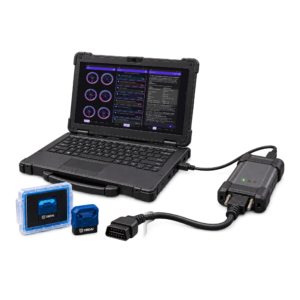
Let ARIA coordinate a diagnostic plan with five simultaneous watches and check-ins.

Bring ARIA the symptom on your next problem car. She can choose the readings, watch for relevant changes and schedule follow-ups while you work through the evidence. Reopen the recorded drive and keep the findings with your Pro reporting tools.

✓One combined active pool
5 watches and check-ins in any mixture.
✓Optional automatic follow-ups
20 per connected session, 300 per account/month. The app must remain open and connected.
✓Existing questions and quick search
Keep their usual access. Upgrading does not refill account usage.
✓ARIA deep research
3 completed jobs per month, one at a time. A job that fails or returns no cited report does not count.
OBDonUDS is included with PRO.SAE J1979-2 support requires the OBD BLE GEN2 adapter.
$24.92/moFirst-year monthly equivalent · annual plan$299 billed annuallyIncludes a GEN2 scanner and 12 months of Pro.Then $265/year on renewal, service only.
Cancel renewal anytime.
Shipping and tax, if applicable, appear at checkout.

Have ARIA keep an eye on two things while you drive.

Tell ARIA what the car is doing. She can choose available readings, set a timed follow-up and watch for the change that matters, so you can follow a diagnostic plan without building one yourself.

✓One combined active pool
2 watches and check-ins in any mixture.
✓Optional automatic follow-ups
8 per connected session, 100 per account/month. The app must remain open and connected.
✓Existing questions and quick search
Keep their usual access. Upgrading does not refill account usage.

ARIA analyzes the evidence. You decide the next step.

Ask ARIA what changed, how the readings fit together and what deserves a closer look. Explore Mode 6, live parameters, Freeze Frame and your vehicle’s history.

✓Deep AI analysis
Measured values, ECU limits and operating conditions, interpreted together.
✓Vehicle history with context
Compare stored sessions and investigate changes over time.
✓An explanation you can keep
Voice, photos, vehicle memory and shareable reports.
Premium browser access is read-only. Interactive ARIA Web Chat and custom shop-branded reporting are PRO.

Hit the ground running with the pro shop tools you already own.

Connect your J2534 VCI on Windows and put ARIA to work on the next problem car. She selects the readings, follows the evidence and directs the next test. As soon as you get your license key, download the Windows app and fire it up.

✓Your VCI, on Windows
Works with Windows J2534-compatible interfaces across manufacturers. Install your interface manufacturer's Windows driver and move your Ultra seat between your Windows PCs as needed. See compatible interfaces
✓Your vehicle data, brought together by ARIA
Live readings, test results and recorded history give ARIA the evidence to work through the problem and direct your next diagnostic step.
✓Ready for upcoming OEM parameters.
Some upcoming manufacturer-specific parameters will require a compatible J2534 interface. Others will also be available through GEN2.
✓GEN2 wireless adapter included
Ships with your order for phone, tablet and road tests. Start on your VCI before it arrives.
✓Everything in Pro
Pro dashboard, branded reports and PDFs on every device. Also: 10 deep-research jobs a month and up to 10 active watches and check-ins.
$41.58/moFirst-year monthly equivalent · annual plan$499 billed annuallyYour first year, everything in Pro, and a shipped GEN2 wireless adapter.Then $365/year on renewal, service only.
Cancel renewal anytime.
Shipping and tax, if applicable, appear at checkout. VCI, PC and tablet not included.
SKU: GEN-2-ANNUAL-BUNDLE

OBDAI Annual Premium Bundle – AI OBD2 GEN 2 Scanner + 1 Year Premium

(10 customer reviews)

Description

  1. GEN 2

OBDAI Premium + GEN 2 Professional Scanner

Have ARIA keep an eye on two things while you drive.

⚡ GEN 2 Bluetooth 5.0 Scanner Included | 📦 FREE U.S. Shipping | 🔄 Free Lifetime Software Updates

Have ARIA keep an eye on two things while you drive.

Tell ARIA what the car is doing. She can choose available readings, set a timed follow-up and watch for the change that matters, so you can follow a diagnostic plan without building one yourself.

ARIA could watch coolant temperature during warm-up and check back in five minutes to review the trend, or watch two supported signals. Two watches, two check-ins, or one of each use the same two-slot pool.

📦 Your Complete Diagnostic Package

🚀 OBDAI Premium Software (1 Year)

  • Full access to ARIA’s diagnostic AI engine
  • Unlimited ARIA AI agent chat sessions
  • Web dashboard access — view your diagnostic history, conversations, and reports from any browser
  • Memory persistence — ARIA remembers all prior conversations about your vehicle across sessions and devices
  • Visual repair assistant with step-by-step videos
  • Component location photos for your specific vehicle
  • Race Mode with 6 fullscreen live gauges
  • Cloud sync across all your devices
  • Priority customer support

⚡ Professional GEN 2 OBD2 Scanner

  • Advanced 25K80 chip with Bluetooth 5.0 for faster, more stable connections
  • Multi-protocol support – SAE J1850 PWM/VPW, ISO9141-2, ISO14230-4 KWP, ISO15765-4 CAN
  • Works with 1996+ gasoline vehicles, 2004+ diesel
  • Read/clear fault codes, freeze frame data, MIL status, vehicle info
  • Battery voltage monitoring and oxygen sensor testing
  • Compact design (47×46×24mm) – stays out of the way while driving
  • 1-year manufacturer warranty

📦 FREE U.S. Shipping

Free shipping to the lower 48 U.S. states. International shipping available for a flat $14.99.

⚡ Why the GEN 2 Scanner Is Better

🔵 Bluetooth 5.0 (vs 4.0)

2x faster data transfer, more stable connection, better range – especially important for iOS devices

🧠 Advanced 25K80 Chip

Professional-grade processor handles complex diagnostics and multiple simultaneous parameters without lag

📊 Enhanced Protocol Support

Supports 9 different vehicle communication protocols including high-speed CAN (11bit & 29bit) for modern vehicles

🤖 Why OBDAI Premium Is Different

❌ Traditional OBD2 Apps

  • Show you “P0420 – Catalyst System Efficiency Below Threshold”
  • Leave you Googling what it means
  • No guidance on whether it’s urgent or how to fix it
  • Every session starts from scratch — no memory of past conversations

✅ OBDAI Premium with ARIA

  • “Your catalytic converter isn’t working efficiently. This could be caused by a failing O2 sensor ($150-300 fix) or the converter itself ($800-2500). Let’s check your O2 sensor data first…”
  • Shows you a video of how to test the O2 sensor on your specific vehicle
  • Photo showing where the sensor is located on YOUR car model
  • Chat from the app or any web browser — conversations sync seamlessly
  • ARIA remembers what you already discussed — come back a week later and pick up right where you left off
  • Tracks the issue over time to see if it gets worse

✅ Free Features (Even After Subscription Ends)

OBDAI remains a powerful diagnostic tool forever, even without Premium

  • Lifetime updates — new vehicles, features & fixes included
  • Real-time OBD2 monitoring – Track 220+ live parameters (RPM, coolant temp, fuel trim, O2 sensors, throttle position, etc.)
  • Read & clear check-engine codes – Full DTC diagnostic capabilities for all vehicle systems
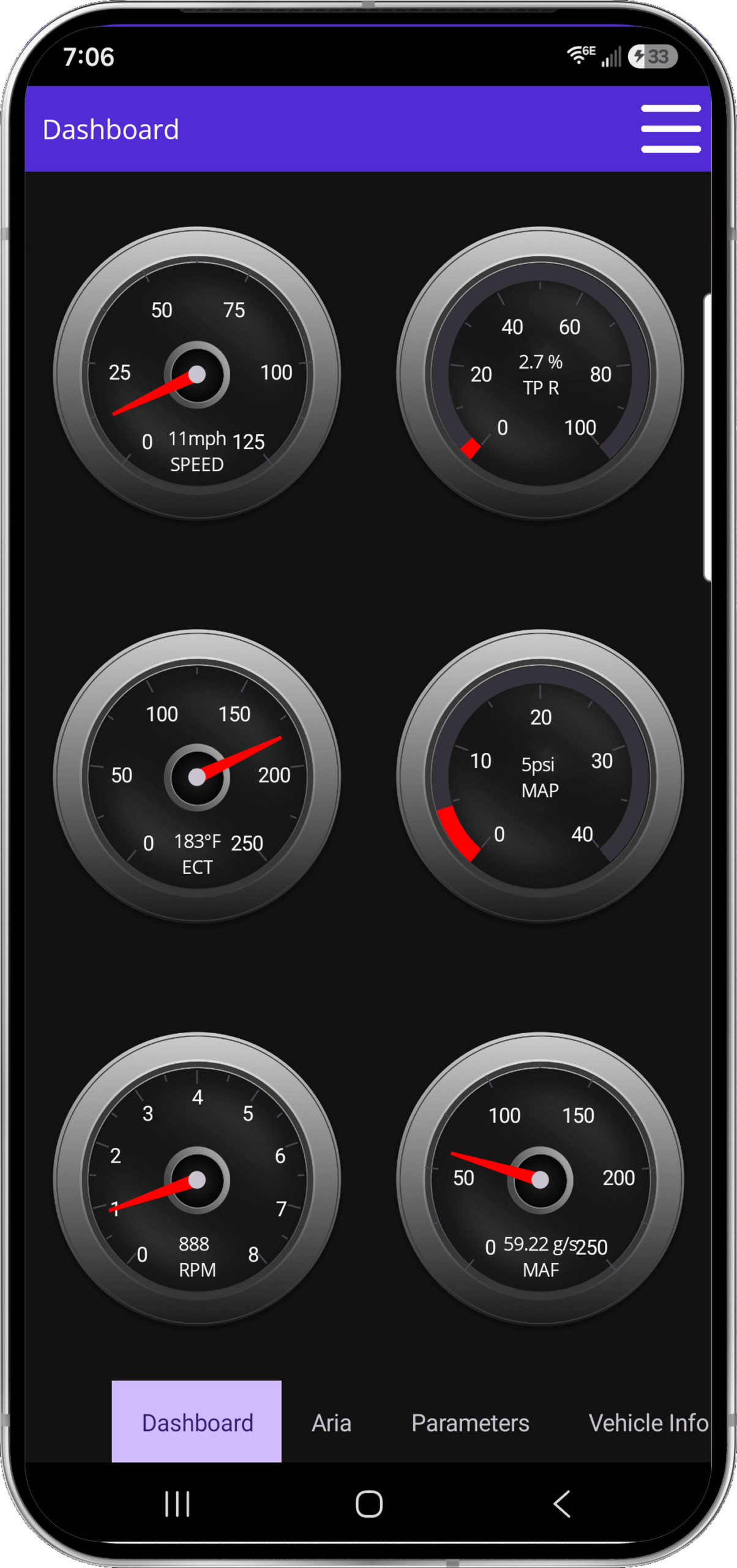
  • Live dashboard and graphs – Six fixed digital gauges plus selectable parameter graphs
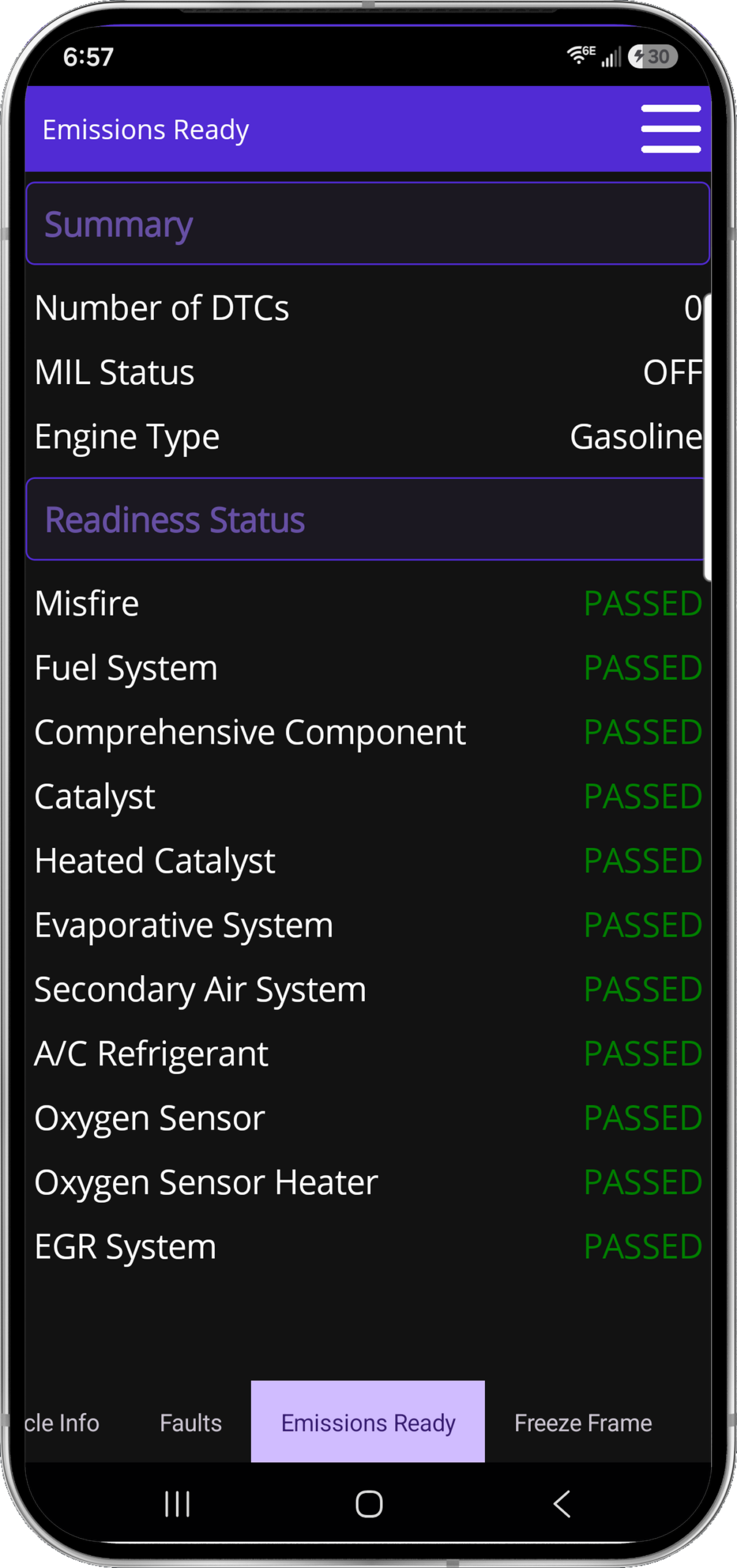
  • Emissions readiness check – Know if you’ll pass smog before going to the testing station
  • VIN decoder – Instantly pull vehicle specifications and information
  • Freeze frame data – See exact conditions when a fault code was triggered
  • Trip computer – Track fuel economy, trip distance, and driving metrics
  • Battery voltage monitoring – Keep track of your electrical system health
  • Oxygen sensor testing – Verify sensor performance and efficiency

⚙️ Universal Compatibility

✓ Works on Windows, iOS, and Android

One subscription works on all your devices with cloud sync

✓ GEN 2 Scanner Protocol Support:

  • SAE J1850 PWM (41.6Kbaud) – Ford, Mazda
  • SAE J1850 VPW (10.4Kbaud) – GM, older vehicles
  • ISO9141-2 (5 baud init, 10.4Kbaud) – Asian, European vehicles
  • ISO14230-4 KWP (fast/slow init) – European vehicles
  • ISO15765-4 CAN (11bit & 29bit, 250-500 Kbaud) – Modern vehicles (2008+)

✓ Compatible Vehicles:

  • Gasoline: 1996+ (All OBD-II vehicles)
  • Diesel: 2004+
  • Hybrids & EVs: Most models with OBD-II port

Ford, Toyota, Honda, Chevrolet, Volkswagen, BMW, Audi, Mercedes, Nissan, Mazda, Subaru, Dodge, Ram, Jeep, Hyundai, Kia, Tesla, and virtually all other brands

Already have an OBD2 adapter? OBDAI works with all major ELM327 adapters (Vgate iCar Pro, OBDLink, BAFX, Carista, Veepeak, etc.)

🔒 Your Data Stays Private

  • No tracking or data selling – We never sell your driving data to insurance companies or third parties
  • Encrypted communications – Bank-level security for all vehicle data transmission
  • Optional analytics – You control what data gets shared (if any)

A Real ARIA Diagnostic Session

2011 Nissan Xterra 4.0L — P0133 / P0171 (System Too Lean, Bank 1)

ARIA

“Active P0133 specifically points at slow response. Bank 1 LTFT (+8.4%) is higher than Bank 2 but not wildly high, and MAF looked reasonable — so this doesn’t scream a major airflow error. The most convincing fit is a lazy Bank 1 upstream sensor, not a vacuum leak or the cat.”

TECH

“Thank you, this was very helpful. I also watched the live data on a scan tool and agree with the lazy Bank 1 upstream sensor. Thanks!”

Real OBDAI session. Four competing lean theories — ARIA picked the right one, and the tech confirmed it independently on a second tool.

🌍 Shipping & Support

Free U.S. Shipping: Free domestic shipping to the lower 48 states. International orders ship for a flat $14.99. Most U.S. orders arrive within 3–5 business days. International orders typically 7–14 business days. Import duties and VAT (where applicable) are customer responsibility.

Instant Software Access: Activate your Premium subscription immediately upon purchase. Download OBDAI for Windows, iOS, or Android while you wait for your scanner to arrive.

Customer Support: Premium subscribers get priority email support. Typical response time: 24 hours or less.

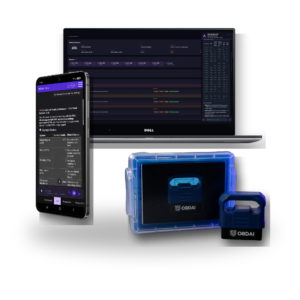
Product images are mockups for illustration purposes only. Tablets, phones, and laptops shown are not included. This bundle includes the GEN 2 wireless OBD-II interface and 1 year of OBDAI Premium (auto-renewing annual subscription, cancel anytime).

Get OBDAI Premium + GEN 2 Scanner Today

1 Year of Premium AI Diagnostics

Professional GEN 2 OBD2 scanner & free U.S. shipping included

Continue using free features forever • Then less than $10/mo, billed annually • Cancel anytime

Choose room for your diagnostic plan

You describe the problem; ARIA plans the readings, conditions and follow-ups. Check-ins and condition watches share one active-slot pool in any mixture.

Plan allowances. Existing purchased rights are preserved.
Allowance or capability Premium Pro Ultra
Active watches and check-ins, combined 2 5 10
Optional automatic follow-ups per connected session 8 20 40
Optional automatic follow-ups per account/month 100 300 600
ARIA deep research: completed jobs per account/month Not included 3; one job at a time 10; one job at a time
Normal ARIA questions and existing quick search Usual access Usual access Inherits Pro
Pro dashboard, reporting and shop branding Premium reporting rules Included Inherits Pro
Supported Windows J2534 connection Not included Not included One transferable Windows seat
Hardware in these GEN2 bundles GEN2 GEN2 GEN2; J2534 interface, PC and tablet excluded

Watches and check-ins require the app to remain open and connected. Cloud features require internet. Vehicle, ECU, adapter and sampling support determine the readings available; a slot is not a faster polling rate.

Already subscribed? Purchased Premium/Pro allowances continue through the applicable paid term, including protected historical 5-slot/20-follow-up and uncapped monthly promises where purchased. Perpetual rights remain protected. New limits are not a silent midterm reduction.

Plan and billing questions

What counts as an automatic follow-up?

One optional ARIA review started by a due check-in or condition watch. Several events reviewed together count as one follow-up; internal tools, searches and connection retries are not separate follow-ups. A review that starts processing spends one allowance even if its answer later fails. A request refused before processing spends none. Built-in check-engine-light and new-stored-code alerts do not spend the optional allowance.

When do allowances reset?

Monthly allowances, including research jobs, reset at the start of each calendar month (UTC). They are shared across sessions, vehicles and devices. Unused allowance does not roll over, and there is no automatic paid overage. Upgrading changes the allowance without refilling usage.

Can ARIA monitor while the app is closed?

No. Keep the app open and connected for watches and check-ins. A watch uses fresh readings and a confirmed change. ARIA helps you evaluate the evidence; it does not repair the vehicle for you.

How is deep research different from quick search?

Quick search returns a few short results inside normal ARIA questions. Deep research is a separate job: in the OBDAI app, choose Research a question, type the question with the vehicle details and any readings you want checked, and confirm. ARIA searches, opens and reads factory service sources, then returns a cited report: what she found, where it came from and what to confirm at the car. It does not read your recorded session on its own, so put the readings in the question. Pro includes 3 completed research jobs per month and Ultra includes 10, one job at a time per account. A job that fails or returns no cited report does not count. A report can explain conflicting or missing evidence; it cannot guarantee a pinout, procedure or repair result.

When does my paid year begin?

Your subscription starts and charges when you buy. Activating or redeeming later gives you the remaining purchased term; it does not start another year or move your renewal date. Find the actual paid-through and renewal dates in My Account subscriptions.

Does renewal include another scanner?

No. The new bundle includes a shipped GEN2 initially. Ultra renews at $365/year for service only, without replacement hardware. Pro service renewal remains $265/year. Shipping and tax, if applicable, are shown separately at checkout.

How do I upgrade website Pro to Ultra?

OBDAI Ultra adds a supported Windows J2534 connection and 10 deep-research jobs per month to Pro. Use Upgrade or Downgrade on the applicable subscription in My Account. Woo checkout shows your actual credit, amount due and renewal date. It switches the existing software subscription, with no second GEN2 or second recurring subscription. Store purchases follow their own channel rules; contact support before making a second purchase.

Where can I recover my order or activation details?

Open My Account orders and the paid order details. Sign in to the intended OBDAI account before redeeming the license. Digital access and the GEN2 shipment are separate; you do not need to wait for the scanner delivery to begin with supported equipment. For an unresolved paid order, contact support@obdai.app.

How do cancellation and refunds work?

Use My Account subscriptions to manage renewal and view its current status and paid-through date. Contact support for a refund request under the applicable purchase terms. This page does not add a new refund guarantee or extend a cancelled or refunded term.

Additional information

OBDAI Annual Subscription

Plan

Premium

10 reviews for OBDAI Annual Premium Bundle – AI OBD2 GEN 2 Scanner + 1 Year Premium

  1. Chris K –

    Gen 2 is the move - trust me

    Upgraded from Gen 1 after 6 months and the build quality difference is noticeable. Faster connection and stays paired better. If youre on the fence between Gen 1 and Gen 2 just get the Gen 2. The extra cost is worth it for something youll use for years.

  2. Amanda L –

    Worth every penny for the peace of mind

    Single mom with zero car knowledge. This thing has saved me from being taken advantage of at the shop twice now. When they quoted me a ton for repairs I checked OBDAI first and it told me the actual issue was minor. Went to a different shop and confirmed it. Paid way less. Cannot recommend enough for anyone who feels intimidated at mechanics.

  3. Sarah Thompson –

    My husband finally stopped asking me to check his car

    Bought this for my husband who treats the check engine light like a suggestion. Now he actually checks it himself AND understands the explanation. The visual repair guides are a game changer, he watched the video and changed his own O2 sensor. Im shocked. Money well spent.

  4. Marcus_TechLife –

    Professional grade results at consumer prices

    ASE certified tech here been in the business 18 years. Bought this for my personal vehicles at home. Im genuinely impressed. The AI interpretation matches what Id expect from shop-grade diagnostics. It wont replace a proper scan tool for deep manufacturer diagnostics but for 95 percent of check engine lights this handles it better than most scanners Ive used.

  5. Nicole F –

    Best customer experience Ive had in a while

    Ordered Sunday night and shipped Monday and arrived Wednesday. The whole experience from website to unboxing just felt premium. Like someone actually thought about the customer journey. Small thing but refreshing compared to the usual Amazon chaos.

  6. DevOps_Dave –

    Solid premium experience

    The Gen 2 hardware feels substantial. Good Bluetooth range and quick pairing. The app itself is where the magic happens though – the AI assistant genuinely understands context. I described symptoms without even knowing the code and it narrowed down the issue before I even scanned. Very ChatGPT-like experience but for cars.

  7. Robert Chen –

    Fleet manager approved

    We tested 30 of these across our delivery vans after trying Gen 2 for a month. The AI-generated summaries save our maintenance coordinator hours per week. Drivers can self-report with actual data instead of saying its making a weird noise. Integration with the subscription model means predictable costs. Enterprise discount would be nice but the ROI is already there.

  8. James Diamond –

    The OBDAI Annual Premium Bundle has been reliable and easy to use. The GEN 2 scanner connects quickly and the app provides clear information about the vehicle without being confusing. I used it to check a warning light on my car and the results were accurate when I compared them with what the repair shop told me. It has been a practical tool to have on hand and works as expected.

  9. Robert Mastin (verified owner) –

  10. Matthew B. (verified owner) –

Only logged in customers who have purchased this product may leave a review.

$149.99

Trusted by 400+ automotive professionals in independent shops and dealership bays.

OBD2 Scanner Gen 2 - Hardware Component

92 in stock

OBDAI Annual Subscription

92 in stock

See what ARIA makes of the evidence.

Real analysis from recorded vehicle sessions.

01 / ANALYZE

Understand the relationships

ARIA connects monitor results, operating conditions and parameter behavior.

02 / COMPARE

Put changes in context

Compare sessions and check the distance from the ECU’s reported limits.

03 / EXPLAIN

Make the findings useful

Keep the analysis with the vehicle and share a clear report.

ARIA evaluates an oxygen sensor monitor change against the ECU minimum
ARIA · MODE 6 + HISTORY

A changed reading. A reasoned answer.

In this recorded example, ARIA compares 0.583 V with 0.132 V against a 0.050 V minimum. She explains the remaining margin and why a single monitor snapshot does not establish deterioration.

ARIA interprets load intake pressure temperature throttle and fuel trims together
ARIA · PARAMETER ANALYSIS

One reading gains meaning from the others.

ARIA considers coolant temperature, load, manifold pressure, throttle and fuel trims together. The explanation ties the measurements to the vehicle’s operating state.

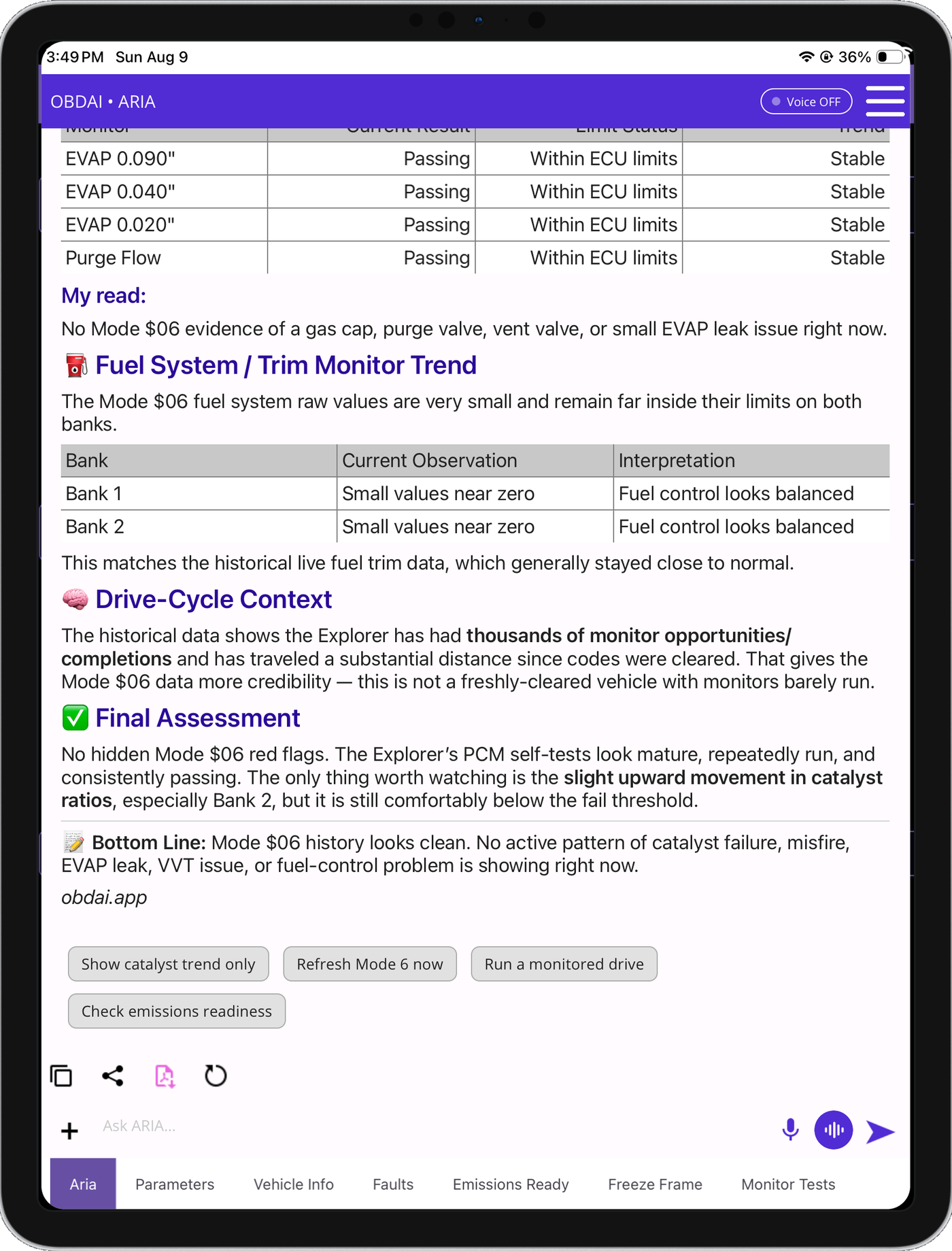
ARIA combines historical monitor results fuel trim history and drive-cycle context
ARIA · HISTORICAL ANALYSIS

Give today’s results a history.

ARIA compares monitor trends with past fuel trims and drive-cycle context. In this example, she identifies a catalyst ratio worth watching while explaining that it remains below the failure threshold.

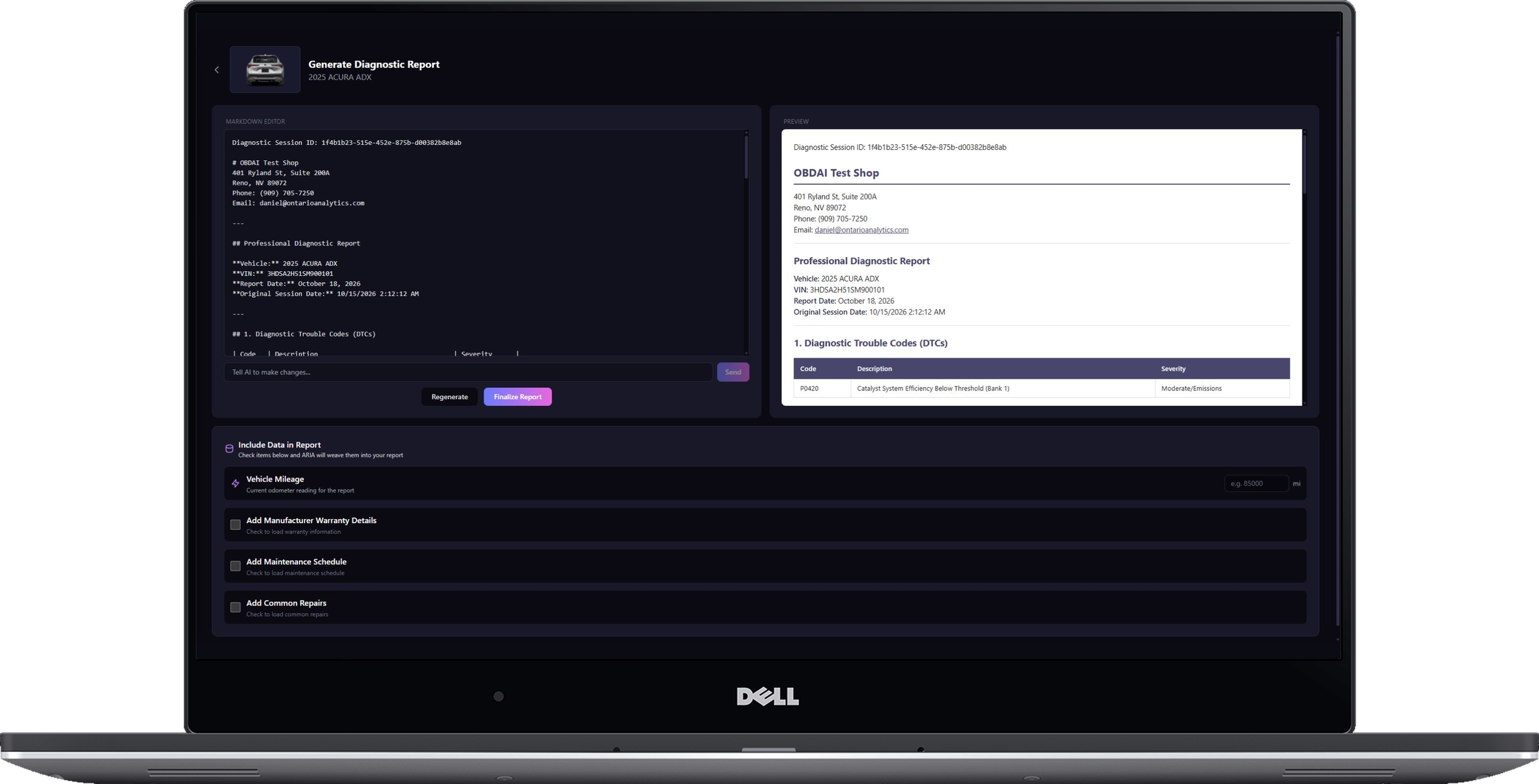
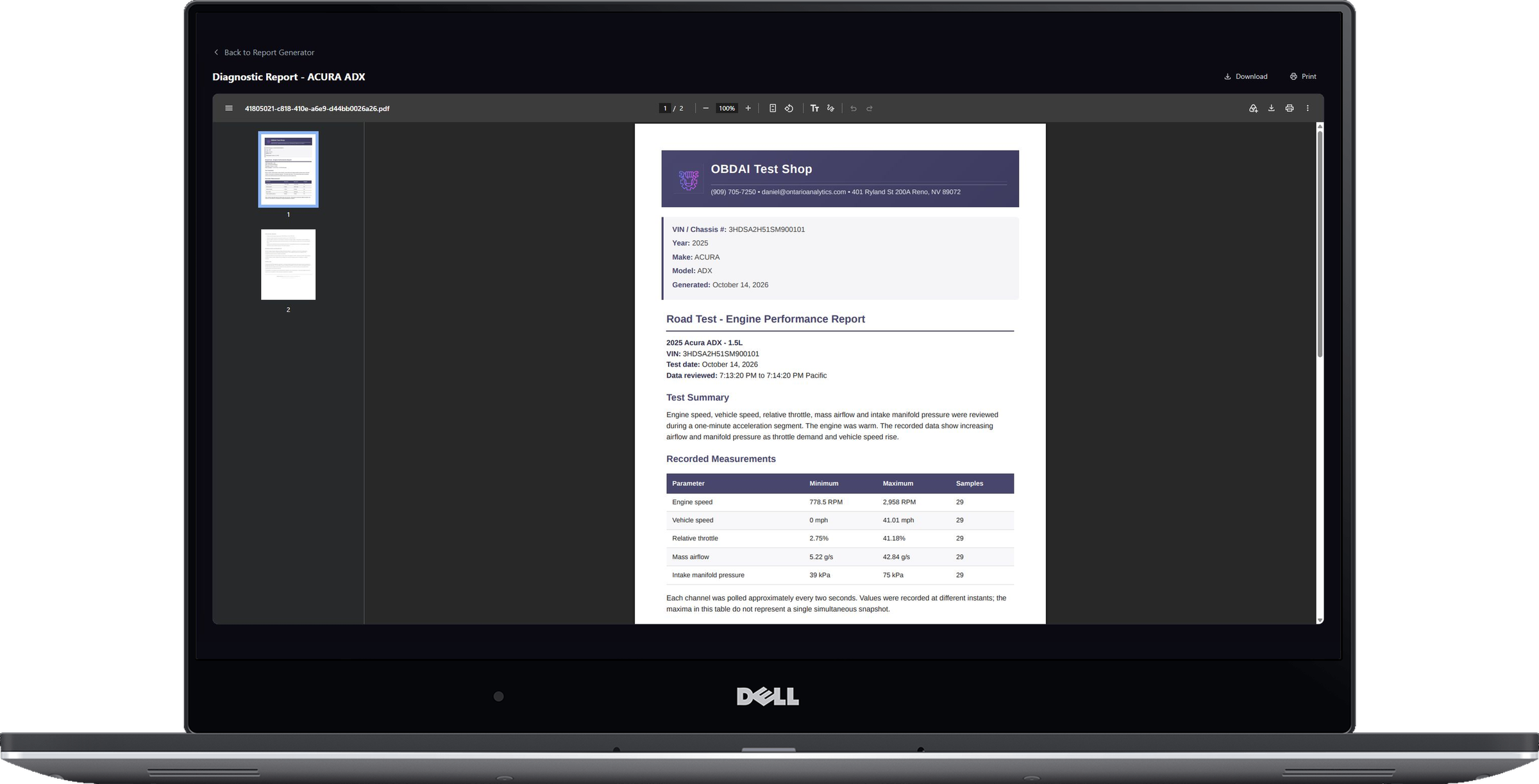
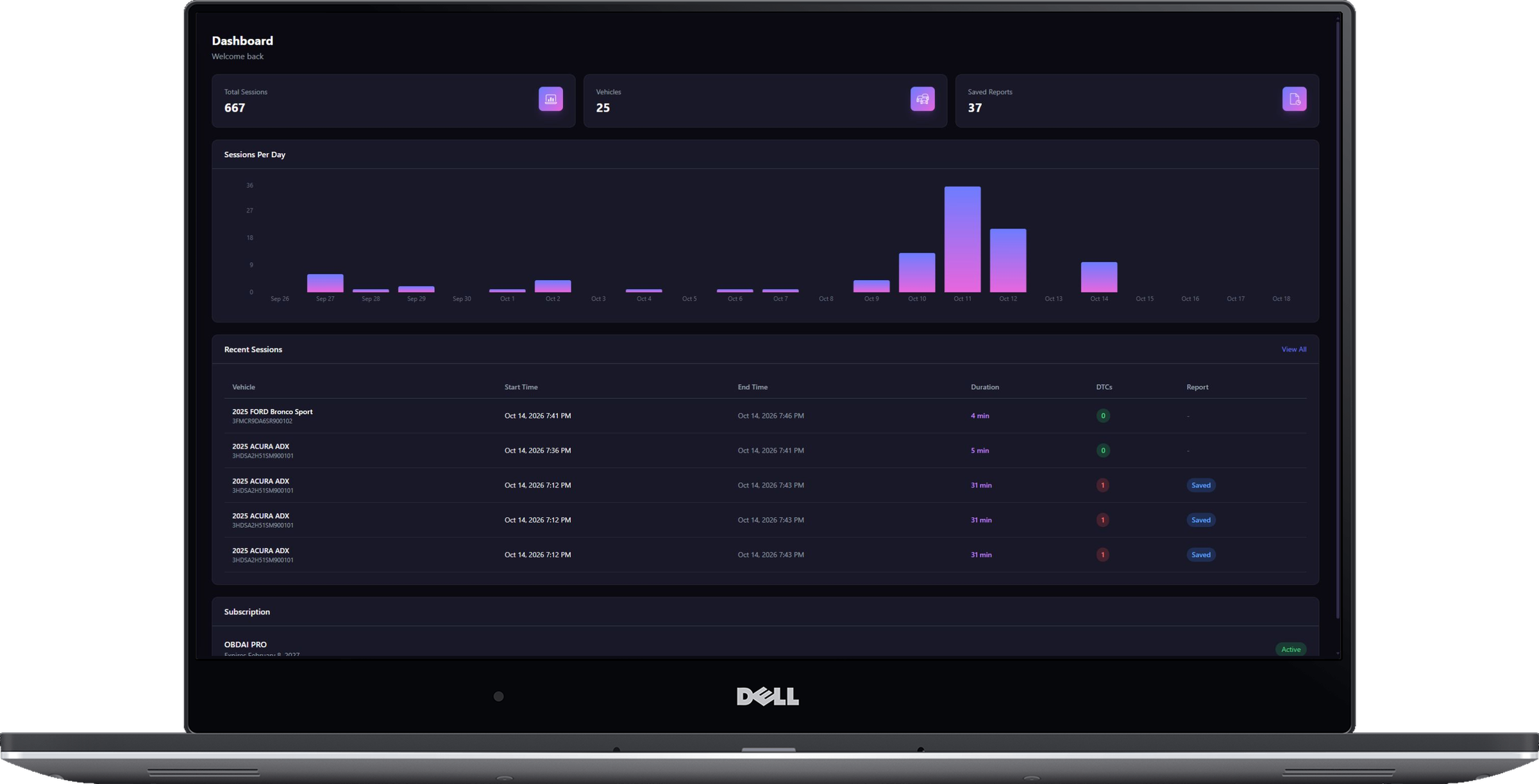
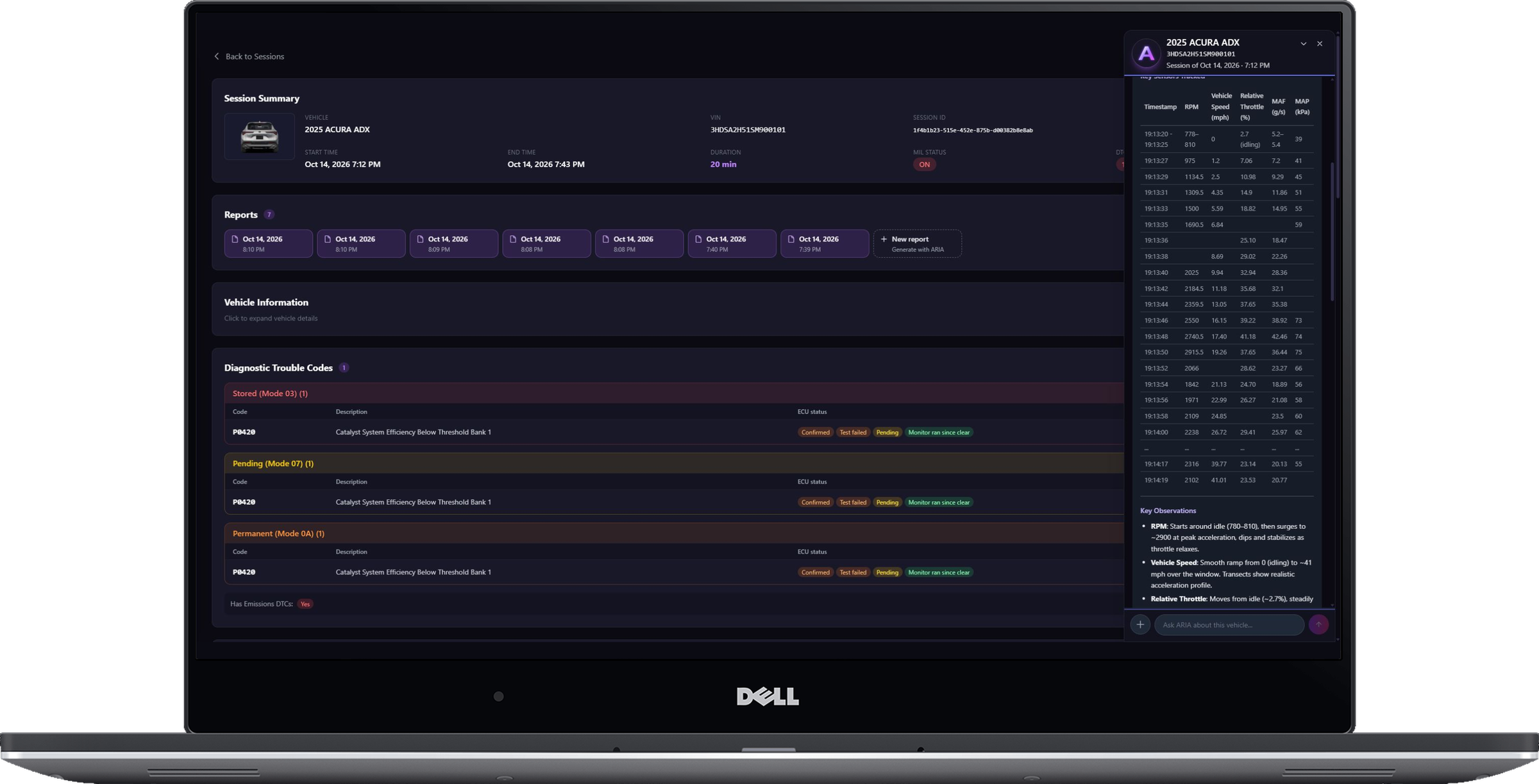
PRO Diagnostic Report builder on laptopSaved PRO diagnostic report viewer on laptop
PRO · REPORT BUILDER + SAVED REPORTS

Build it. Save it. Show the customer.

Continue the analysis with interactive ARIA Web Chat, choose the source session and turn the findings into an editable, shop-branded report with repair and maintenance context.

  • Unlimited editable reports with custom shop branding
  • Repair estimates and maintenance recommendations
  • Market, auction, repair and sales-history context
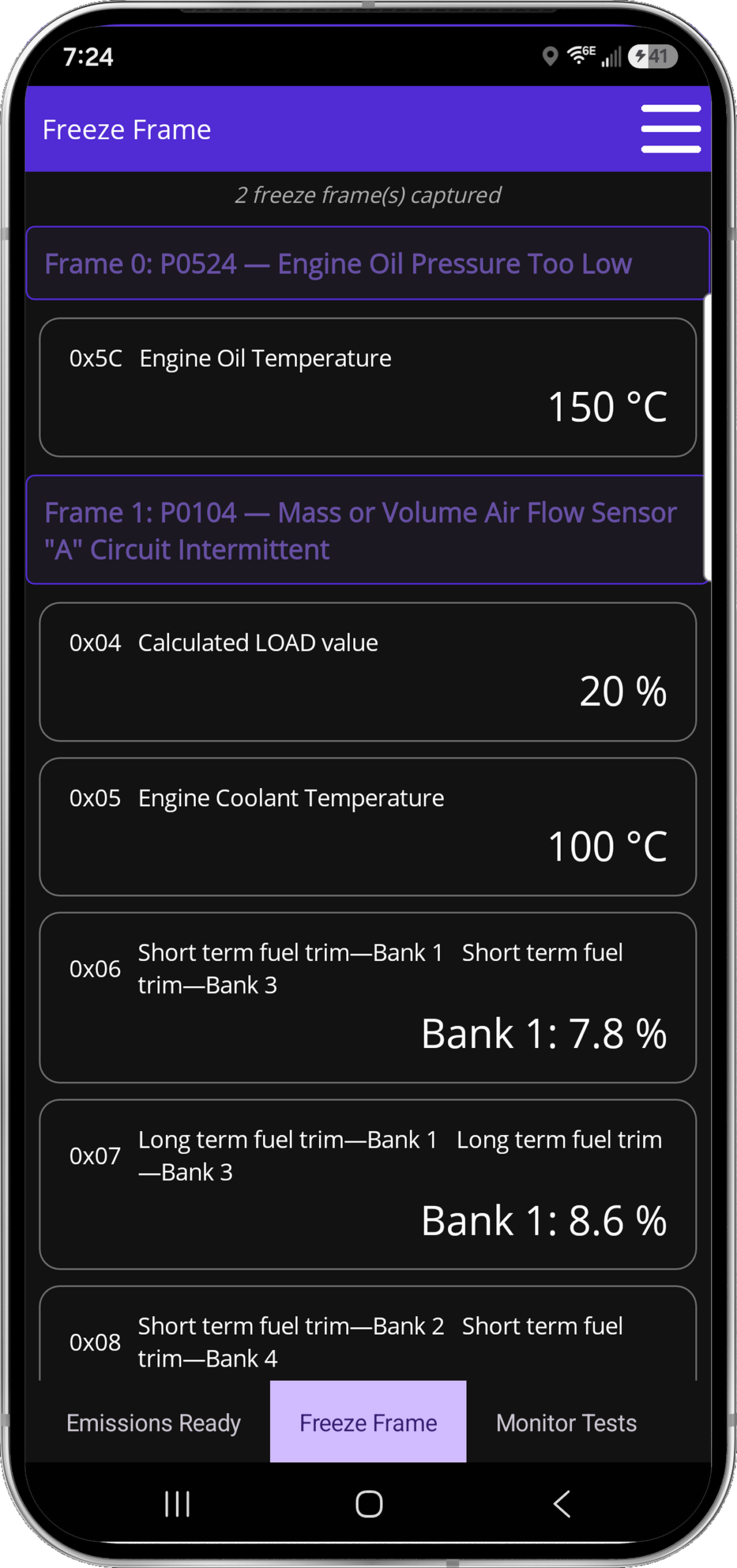
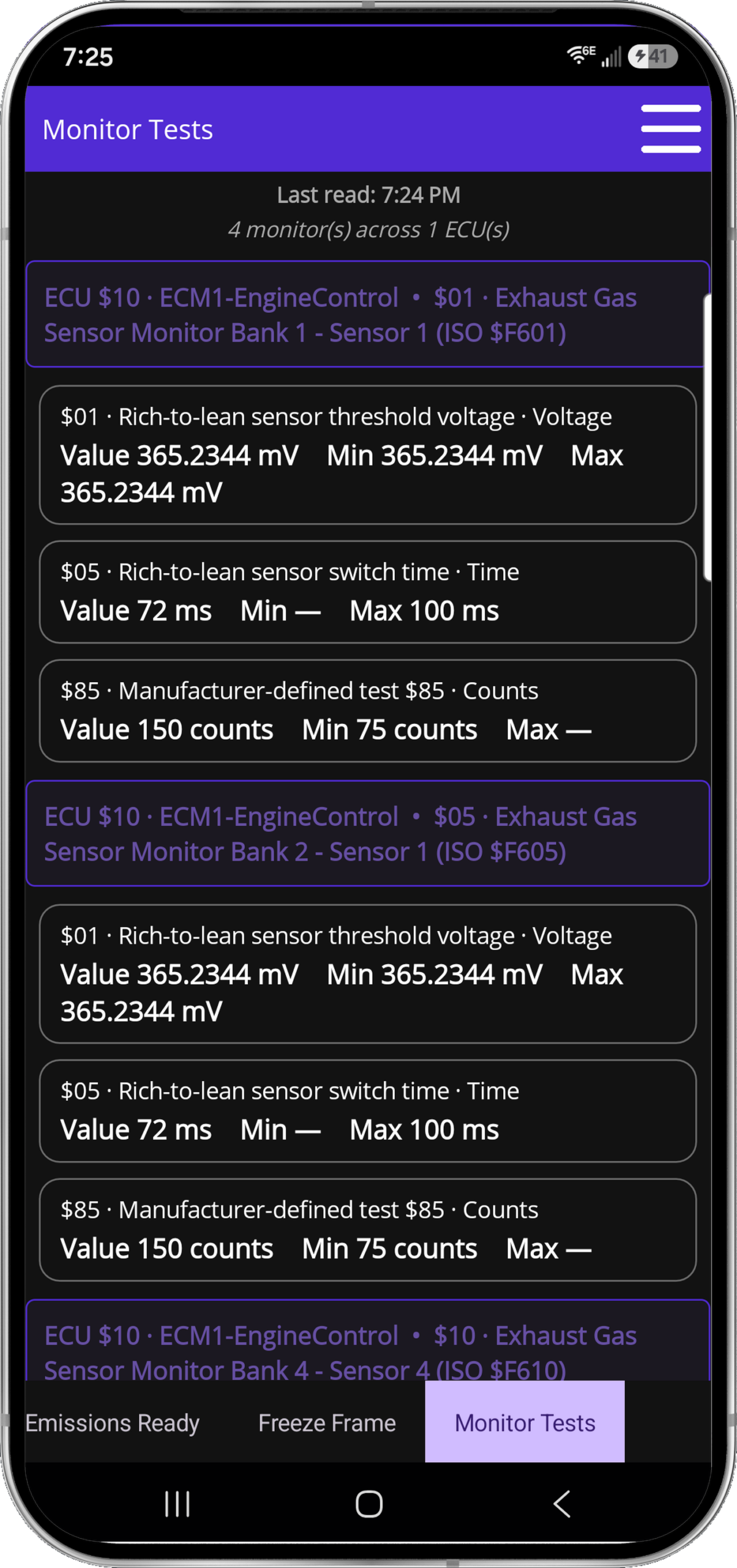
Freeze FrameMode 6
FULL J1979 EVIDENCE

Freeze Frame and Mode 6. Right where they belong.

See the vehicle at the moment the fault set, then check the monitor evidence manufacturers use to judge component performance.

  • Captured Freeze Frame events
  • Mode 6 monitor results and limits
  • Readiness, codes and live data together
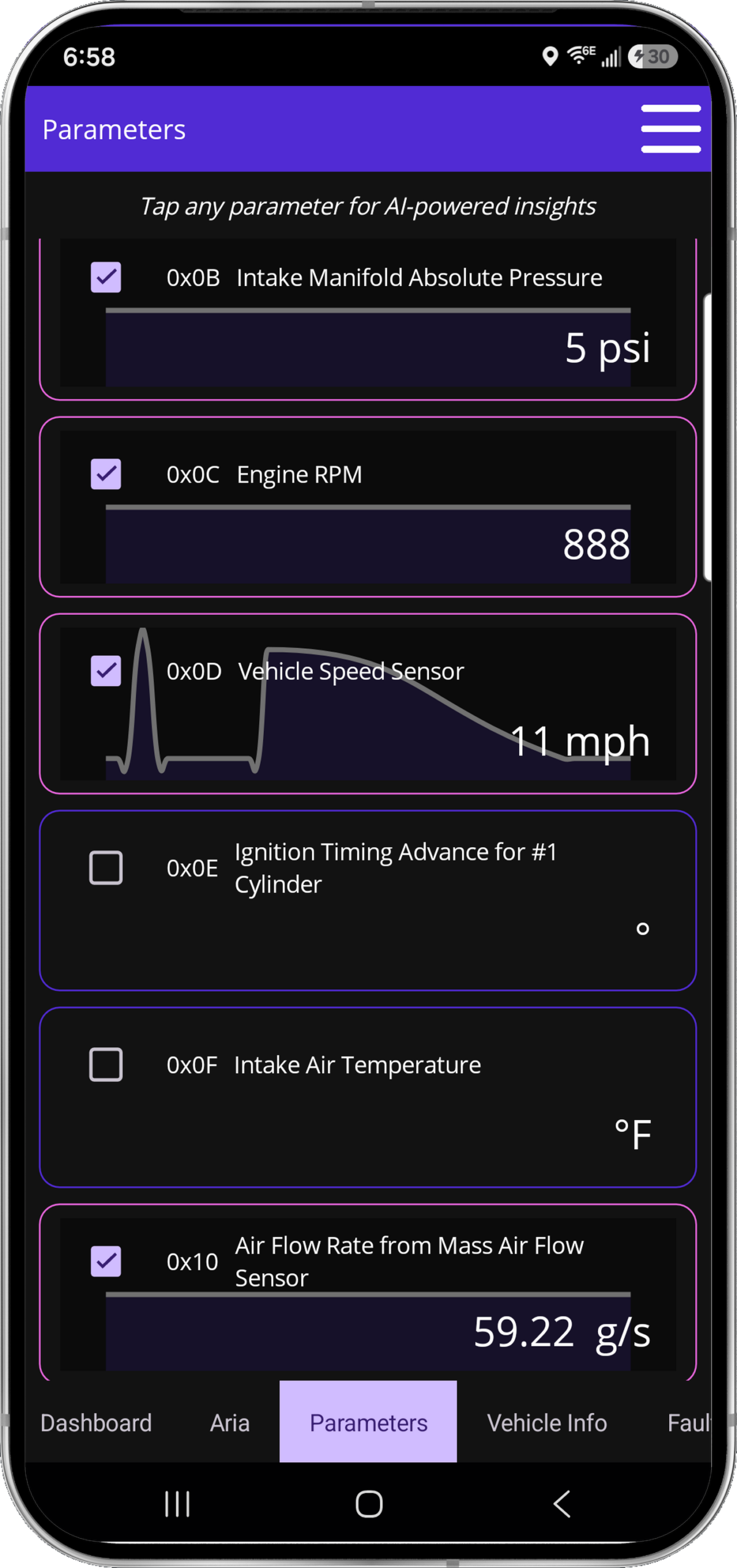
Live parametersGauge dashboardReadiness
LIGHT + DARK · EVERYDAY TOOLS

Every screen earns its place.

Selectable parameter graphs, six fixed dashboard gauges, emissions readiness and complete parameter coverage—presented as the actual product, not caption art.

Included scanner hardware
THE HARDWARE

One adapter. The full workflow.

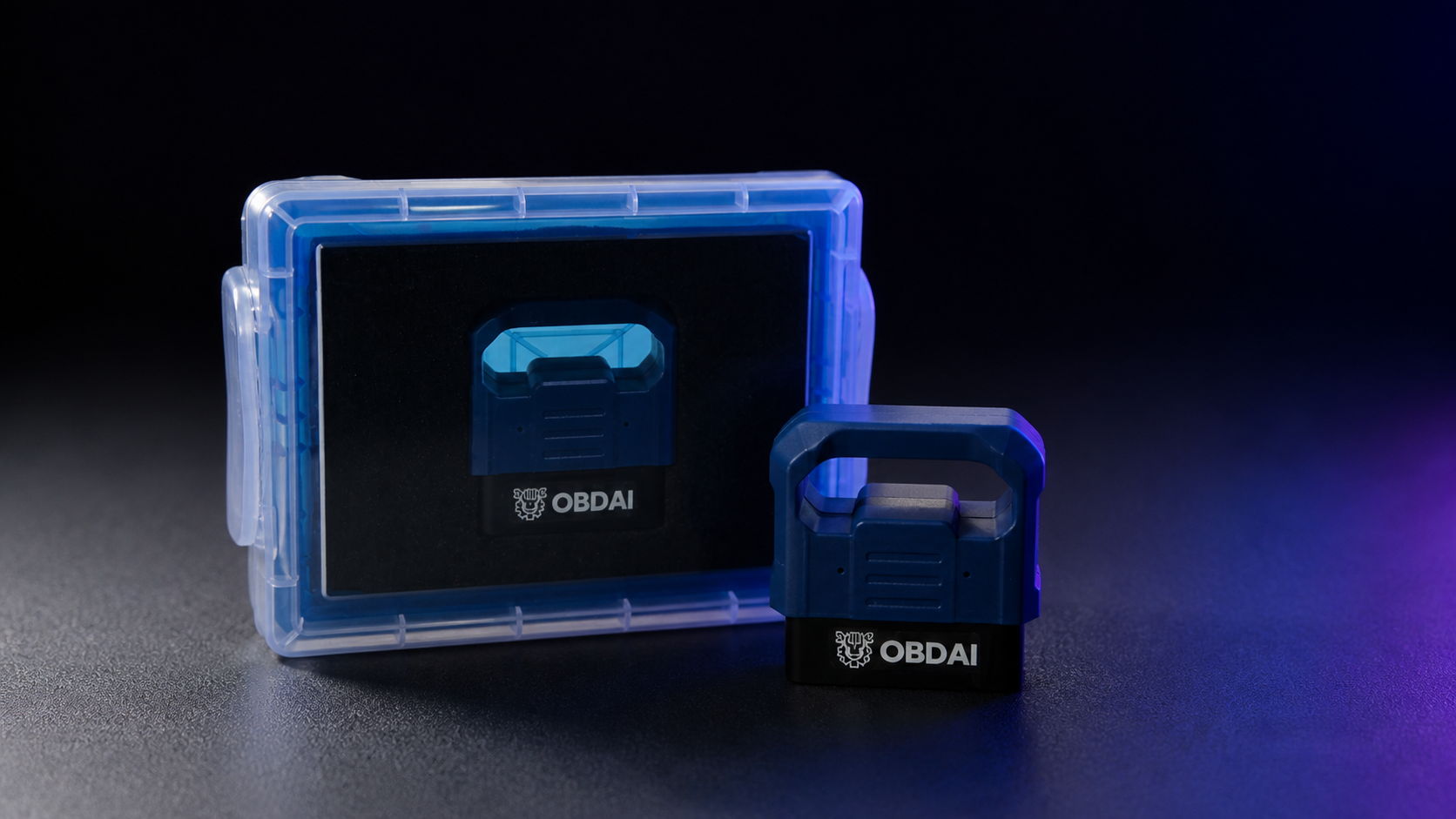
The OBD BLE GEN2 adapter connects the vehicle to OBDAI and enables SAE J1979-2 support. It arrives protected in its own case.

OBDonUDS is included with PRO.

SAE J1979-2 support requires the OBD BLE GEN2 adapter.

See OBDonUDS requirements →

ARIA deep research: factory information when the answer takes digging

Some questions can't be settled from a search snippet: which pin is which on a connector, what a sensor should read unplugged, or the factory test procedure for a code. For those, open Research a question in the OBDAI app, type your question with the year, make, model and engine, and confirm. ARIA searches, opens and reads factory and other primary service sources, then returns a cited report with what she found and where she found it. A job usually takes a few minutes.

Research works from the question you type. It does not read your recorded session on its own, so include the readings you want checked, such as a voltage, a fuel trim or a code.

Why we built it

A shop technician chasing a power-loss complaint on a 2015 Chevrolet Cruze 1.4T asked ARIA for the upstream O2 sensor connector pinout. Quick search only turned up parts-store snippets, so she wouldn't guess which pin was which. With the sensor unplugged he saw 1.275 V and spent the night treating it as a shorted sensor. GM's factory procedure puts the unplugged bias at 1.5 to 3.0 V, more than a generic O2 reading can display, so that reading was normal. With deep research, ARIA found GM's factory test procedure, gave the connector cavities with their tests, explained the 1.275 V reading and flagged that a parts-store pinout had the signal pins reversed.

Ask it things like

  • "2015 Chevrolet Cruze 1.4T: what is the upstream O2 sensor connector pinout, and what should it read unplugged? I measured 1.275 V."
  • "2012 Ford F-150 5.0L: what is the factory test procedure for P0171, and what fuel-trim values should I expect at idle? Long-term trim on bank 1 reads +18%."

What it brings back

  • Factory connector pinouts, wiring and circuit tests, specifications and DTC test procedures, when a credible source exists
  • The sources it cites, and the model years and engine they cover
  • A check of the readings you include, like the 1.275 V reading above
  • Conflicts between sources, such as a parts-store pinout that disagrees with the factory one, and what is still unresolved
  • One practical step to confirm it at the car

Your Pro plan includes 3 completed research jobs per month (Ultra includes 10). One job runs at a time per account. A job that fails or returns no cited report does not count. Research usually takes a few minutes and needs internet. Your normal ARIA questions and quick search keep their usual access. Source availability and applicability vary; research cannot guarantee a pinout, procedure or repair result.

Choose room for your diagnostic plan

You describe the problem; ARIA plans the readings, conditions and follow-ups. Check-ins and condition watches share one active-slot pool in any mixture.

On a small screen, swipe or scroll the table to compare all three plans.

Plan allowances. Existing purchased rights are preserved.
Allowance or capabilityPremiumProUltra
Active watches and check-ins, combined2510
Optional automatic follow-ups per connected session82040
Optional automatic follow-ups per account/month100300600
ARIA deep research: completed jobs per account/monthNot included3; one job at a time10; one job at a time
Normal ARIA questions and existing quick searchUsual accessUsual accessInherits Pro
Pro dashboard, reporting and shop brandingPremium reporting rulesIncludedInherits Pro
Supported Windows J2534 connectionNot includedNot includedOne transferable Windows seat
Hardware in these GEN2 bundlesGEN2GEN2GEN2; VCI, PC and tablet excluded

Watches and check-ins require the app to remain open and connected. Cloud features require internet. Vehicle, ECU, adapter and sampling support determine the readings available; a slot is not a faster polling rate.

Already subscribed? Purchased Premium/Pro allowances continue through the applicable paid term, including protected historical 5-slot/20-follow-up and uncapped monthly promises where purchased. Perpetual rights remain protected. New limits are not a silent midterm reduction.

Plan and billing questions

What counts as an automatic follow-up?

One optional ARIA review started by a due check-in or condition watch. Several events reviewed together count as one follow-up; internal tools, searches and connection retries are not separate follow-ups. A review that starts processing spends one allowance even if its answer later fails. A request refused before processing spends none. Built-in check-engine-light and new-stored-code alerts do not spend the optional allowance.

When do allowances reset?

Monthly allowances, including research jobs, reset at the start of each calendar month (UTC). They are shared across sessions, vehicles and devices. Unused allowance does not roll over, and there is no automatic paid overage. Upgrading changes the allowance without refilling usage.

Can ARIA monitor while the app is closed?

No. Keep the app open and connected for watches and check-ins. A watch uses fresh readings and a confirmed change. ARIA helps you evaluate the evidence; it does not repair the vehicle for you.

How is deep research different from quick search?

Quick search returns a few short results inside normal ARIA questions. Deep research is a separate job: in the OBDAI app, choose Research a question, type the question with the vehicle details and any readings you want checked, and confirm. ARIA searches, opens and reads factory service sources, then returns a cited report: what she found, where it came from and what to confirm at the car. It does not read your recorded session on its own, so put the readings in the question. Pro includes 3 completed research jobs per month and Ultra includes 10, one job at a time per account. A job that fails or returns no cited report does not count. A report can explain conflicting or missing evidence; it cannot guarantee a pinout, procedure or repair result.

When does my paid year begin?

Your subscription starts and charges when you buy. Activating or redeeming later gives you the remaining purchased term; it does not start another year or move your renewal date. Find the actual paid-through and renewal dates in My Account subscriptions.

Does renewal include another scanner?

No. The new bundle includes a shipped GEN2 initially. Ultra renews at $365/year for service only, without replacement hardware. Pro service renewal remains $265/year. Shipping and tax, if applicable, are shown separately at checkout.

How do I upgrade website Pro to Ultra?

OBDAI Ultra adds a supported Windows J2534 connection and 10 deep-research jobs per month to Pro. Use Upgrade or Downgrade on the applicable subscription in My Account. Woo checkout shows your actual credit, amount due and renewal date. It switches the existing software subscription, with no second GEN2 or second recurring subscription. Store purchases follow their own channel rules; contact support before making a second purchase.

Where can I recover my order or activation details?

Open My Account orders and the paid order details. Sign in to the intended OBDAI account before redeeming the license. Digital access and the GEN2 shipment are separate; you do not need to wait for the scanner delivery to begin with supported equipment. For an unresolved paid order, contact support@obdai.app.

How do cancellation and refunds work?

Use My Account subscriptions to manage renewal and view its current status and paid-through date. Contact support for a refund request under the applicable purchase terms.

See what ARIA makes of the evidence.

Real analysis from recorded vehicle sessions.

01 / ANALYZE

Understand the relationships

ARIA connects monitor results, operating conditions and parameter behavior.
02 / COMPARE

Put changes in context

Compare sessions and check the distance from the ECU’s reported limits.

03 / EXPLAIN

Make the findings useful

Keep the analysis with the vehicle and share a clear report.

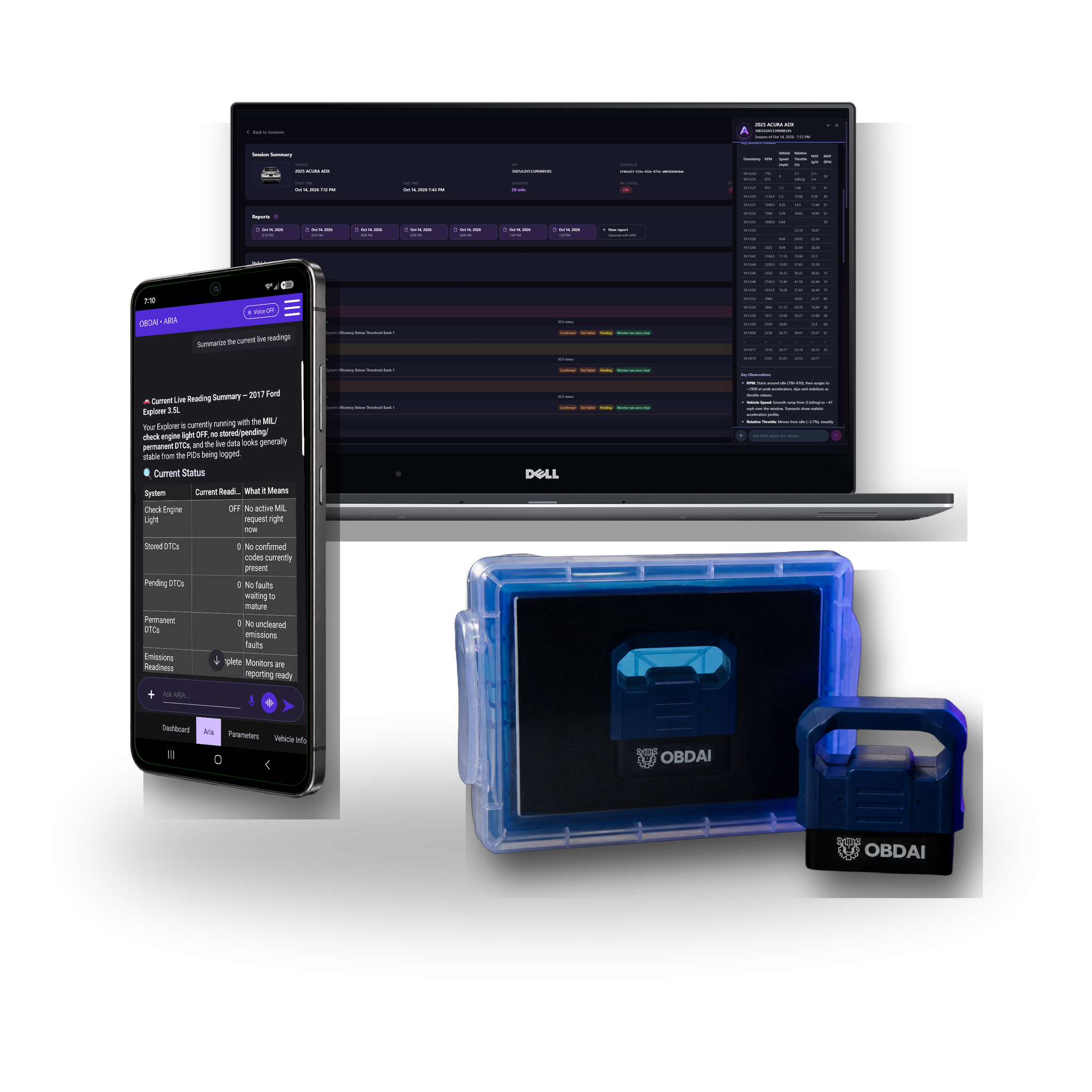
ARIA evaluates an oxygen sensor monitor change against the ECU minimum
ARIA · MODE 6 + HISTORY

A changed reading. A reasoned answer.

In this recorded example, ARIA compares 0.583 V with 0.132 V against a 0.050 V minimum. She explains the remaining margin and why a single monitor snapshot does not establish deterioration.

ARIA interprets load intake pressure temperature throttle and fuel trims together
ARIA · PARAMETER ANALYSIS

One reading gains meaning from the others.

ARIA considers coolant temperature, load, manifold pressure, throttle and fuel trims together. The explanation ties the measurements to the vehicle’s operating state.

ARIA combines historical monitor results fuel trim history and drive-cycle context
ARIA · HISTORICAL ANALYSIS

Give today’s results a history.

ARIA compares monitor trends with past fuel trims and drive-cycle context. In this example, she identifies a catalyst ratio worth watching while explaining that it remains below the failure threshold.

Shareable Premium report on laptop
SHAREABLE REPORTS

Keep the evidence together.

Turn the session into a clear OBDAI report you can download, share and review later with the vehicle history.

Freeze FrameMode 6
FULL J1979 EVIDENCE

Freeze Frame and Mode 6. Right where they belong.

See the vehicle at the moment the fault set, then check the monitor evidence manufacturers use to judge component performance.

  • Captured Freeze Frame events
  • Mode 6 monitor results and limits
  • Readiness, codes and live data together
Live parametersGauge dashboardReadiness
LIGHT + DARK · EVERYDAY TOOLS

Every screen earns its place.

Selectable parameter graphs, six fixed dashboard gauges, emissions readiness and complete parameter coverage—presented as the actual product, not caption art.

Included scanner hardware
THE HARDWARE

Faster GEN2 data. The complete Premium workflow.

The included OBD BLE GEN2 adapter adds BLE 5.0, broader protocol support and up to six compatible sensor readings per exchange.

OBDonUDS for qualifying Premium GEN2 customers

Qualifying OBD BLE GEN2 Premium customers receive OBDonUDS in 2027. Exact timing has not been fixed.

See OBDonUDS requirements →

Choose room for your diagnostic plan

You describe the problem; ARIA plans the readings, conditions and follow-ups. Check-ins and condition watches share one active-slot pool in any mixture.

On a small screen, swipe or scroll the table to compare all three plans.

Plan allowances. Existing purchased rights are preserved.
Allowance or capabilityPremiumProUltra
Active watches and check-ins, combined2510
Optional automatic follow-ups per connected session82040
Optional automatic follow-ups per account/month100300600
ARIA deep research: completed jobs per account/monthNot included3; one job at a time10; one job at a time
Normal ARIA questions and existing quick searchUsual accessUsual accessInherits Pro
Pro dashboard, reporting and shop brandingPremium reporting rulesIncludedInherits Pro
Supported Windows J2534 connectionNot includedNot includedOne transferable Windows seat
Hardware in these GEN2 bundlesGEN2GEN2GEN2; VCI, PC and tablet excluded

Watches and check-ins require the app to remain open and connected. Cloud features require internet. Vehicle, ECU, adapter and sampling support determine the readings available; a slot is not a faster polling rate.

Already subscribed? Purchased Premium/Pro allowances continue through the applicable paid term, including protected historical 5-slot/20-follow-up and uncapped monthly promises where purchased. Perpetual rights remain protected. New limits are not a silent midterm reduction.

Plan and billing questions

What counts as an automatic follow-up?

One optional ARIA review started by a due check-in or condition watch. Several events reviewed together count as one follow-up; internal tools, searches and connection retries are not separate follow-ups. A review that starts processing spends one allowance even if its answer later fails. A request refused before processing spends none. Built-in check-engine-light and new-stored-code alerts do not spend the optional allowance.

When do allowances reset?

Monthly allowances, including research jobs, reset at the start of each calendar month (UTC). They are shared across sessions, vehicles and devices. Unused allowance does not roll over, and there is no automatic paid overage. Upgrading changes the allowance without refilling usage.

Can ARIA monitor while the app is closed?

No. Keep the app open and connected for watches and check-ins. A watch uses fresh readings and a confirmed change. ARIA helps you evaluate the evidence; it does not repair the vehicle for you.

How is deep research different from quick search?

Quick search returns a few short results inside normal ARIA questions. Deep research is a separate job: in the OBDAI app, choose Research a question, type the question with the vehicle details and any readings you want checked, and confirm. ARIA searches, opens and reads factory service sources, then returns a cited report: what she found, where it came from and what to confirm at the car. It does not read your recorded session on its own, so put the readings in the question. Pro includes 3 completed research jobs per month and Ultra includes 10, one job at a time per account. A job that fails or returns no cited report does not count. A report can explain conflicting or missing evidence; it cannot guarantee a pinout, procedure or repair result.

When does my paid year begin?

Your subscription starts and charges when you buy. Activating or redeeming later gives you the remaining purchased term; it does not start another year or move your renewal date. Find the actual paid-through and renewal dates in My Account subscriptions.

Does renewal include another scanner?

No. The new bundle includes a shipped GEN2 initially. Ultra renews at $365/year for service only, without replacement hardware. Pro service renewal remains $265/year. Shipping and tax, if applicable, are shown separately at checkout.

How do I upgrade website Pro to Ultra?

OBDAI Ultra adds a supported Windows J2534 connection and 10 deep-research jobs per month to Pro. Use Upgrade or Downgrade on the applicable subscription in My Account. Woo checkout shows your actual credit, amount due and renewal date. It switches the existing software subscription, with no second GEN2 or second recurring subscription. Store purchases follow their own channel rules; contact support before making a second purchase.

Where can I recover my order or activation details?

Open My Account orders and the paid order details. Sign in to the intended OBDAI account before redeeming the license. Digital access and the GEN2 shipment are separate; you do not need to wait for the scanner delivery to begin with supported equipment. For an unresolved paid order, contact support@obdai.app.

How do cancellation and refunds work?

Use My Account subscriptions to manage renewal and view its current status and paid-through date. Contact support for a refund request under the applicable purchase terms.

See what ARIA makes of the evidence.

Real analysis from recorded vehicle sessions.

01 / ANALYZE

Understand the relationships

ARIA connects monitor results, operating conditions and parameter behavior.
02 / COMPARE

Put changes in context

Compare sessions and check the distance from the ECU’s reported limits.

03 / EXPLAIN

Make the findings useful

Keep the analysis with the vehicle and share a clear report.

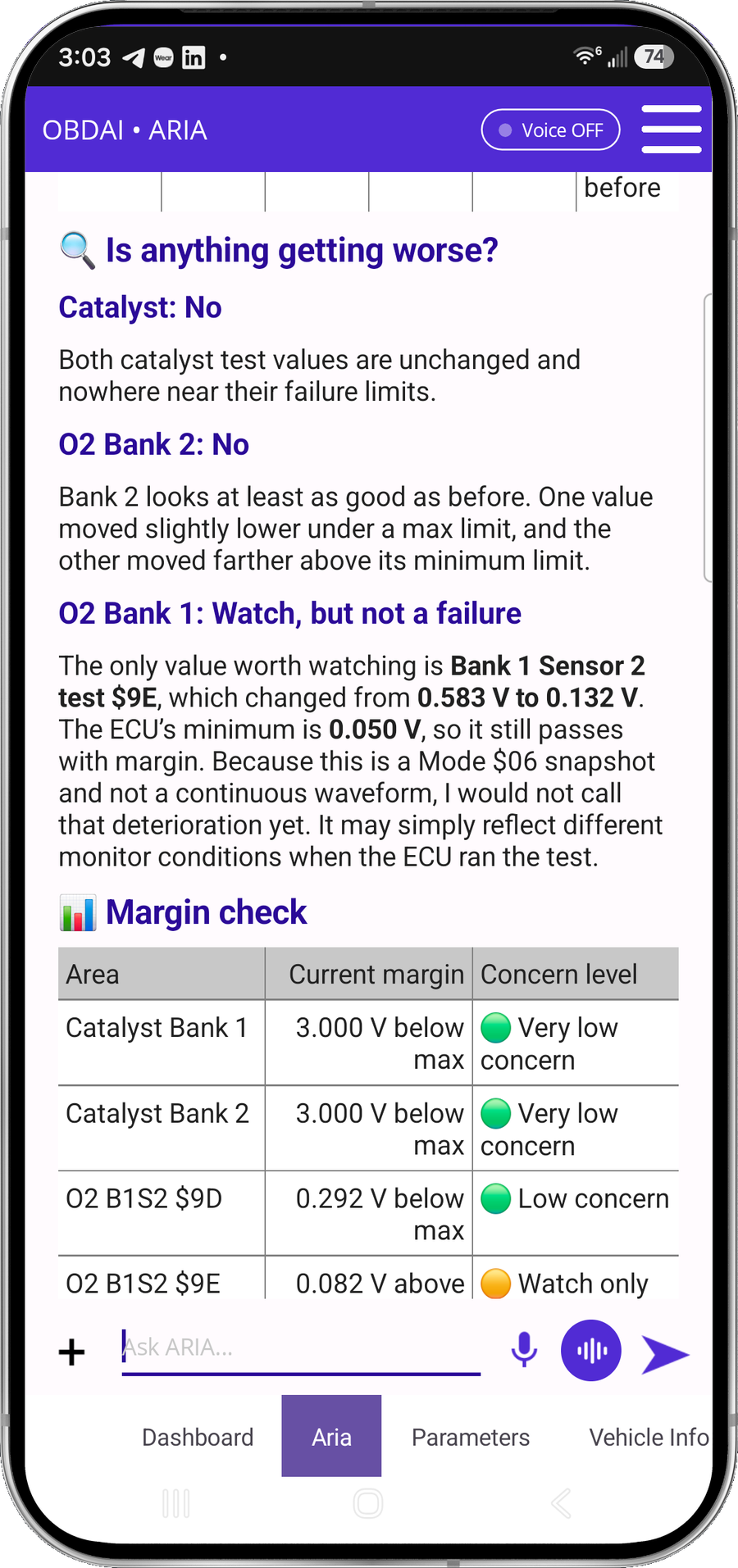
ARIA evaluates an oxygen sensor monitor change against the ECU minimum
ARIA · MODE 6 + HISTORY

A changed reading. A reasoned answer.

In this recorded example, ARIA compares 0.583 V with 0.132 V against a 0.050 V minimum. She explains the remaining margin and why a single monitor snapshot does not establish deterioration.

ARIA interprets load intake pressure temperature throttle and fuel trims together
ARIA · PARAMETER ANALYSIS

One reading gains meaning from the others.

ARIA considers coolant temperature, load, manifold pressure, throttle and fuel trims together. The explanation ties the measurements to the vehicle’s operating state.

ARIA combines historical monitor results fuel trim history and drive-cycle context
ARIA · HISTORICAL ANALYSIS

Give today’s results a history.

ARIA compares monitor trends with past fuel trims and drive-cycle context. In this example, she identifies a catalyst ratio worth watching while explaining that it remains below the failure threshold.

Shareable Premium report on laptop
SHAREABLE REPORTS

Keep the evidence together.

Turn the session into a clear OBDAI report you can download, share and review later with the vehicle history.

Freeze FrameMode 6
FULL J1979 EVIDENCE

Freeze Frame and Mode 6. Right where they belong.

See the vehicle at the moment the fault set, then check the monitor evidence manufacturers use to judge component performance.

  • Captured Freeze Frame events
  • Mode 6 monitor results and limits
  • Readiness, codes and live data together
Live parametersGauge dashboardReadiness
LIGHT + DARK · EVERYDAY TOOLS

Every screen earns its place.

Selectable parameter graphs, six fixed dashboard gauges, emissions readiness and complete parameter coverage—presented as the actual product, not caption art.

Included scanner hardware
THE HARDWARE

The best-value route to Premium.

The standard wireless GEN1 interface is included with the complete Premium software experience for supported vehicles.

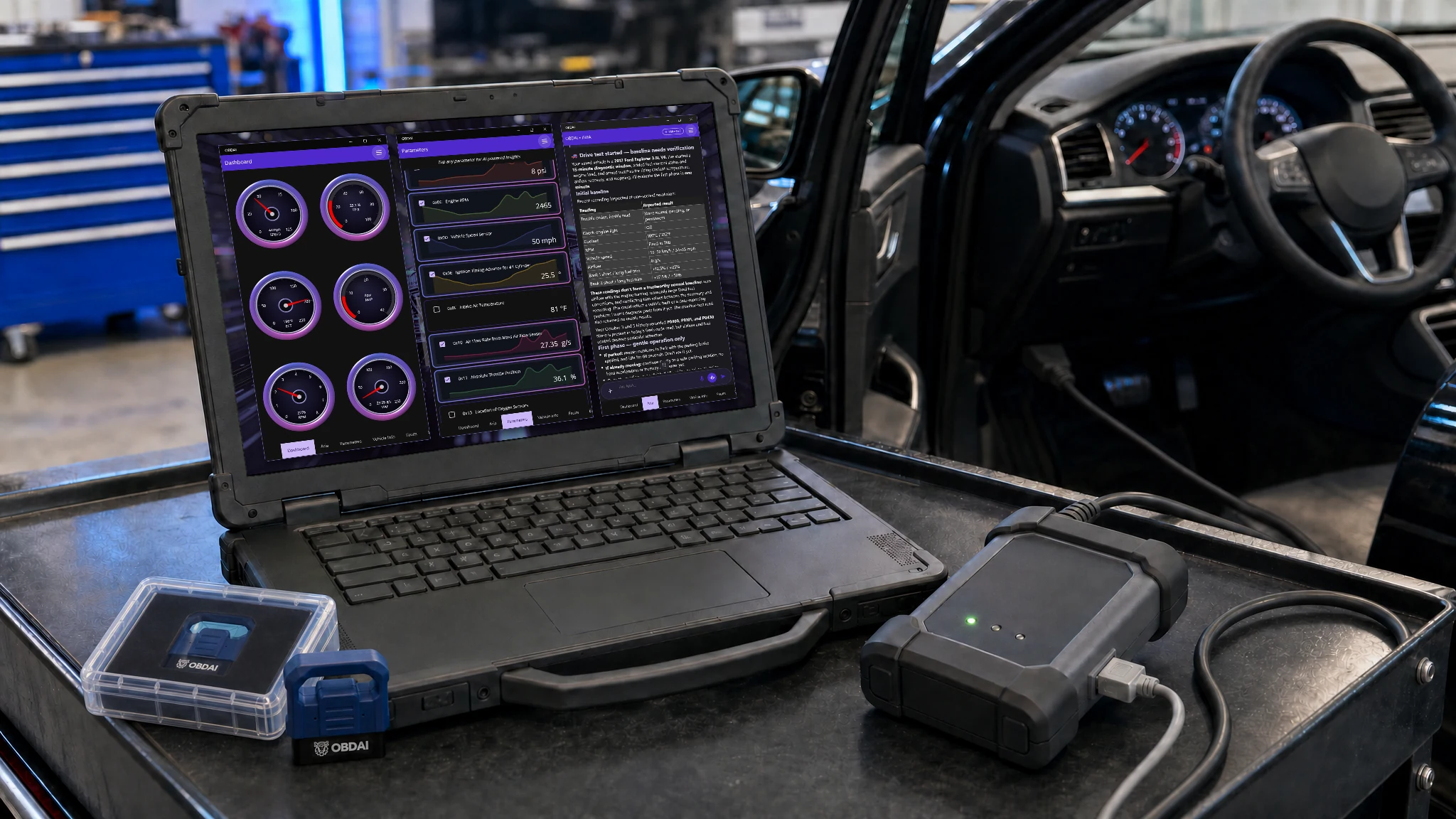
A technician's Windows laptop on a shop cart beside an open car door, showing OBDAI's live gauges over a J2534 pass-through interface cabled by USB to the laptop and to the car. VCI and PC not included.

What you plug in: the VCI you already own

OBDAI Ultra works with Windows J2534-compatible interfaces. OBDAI implements the J2534 04.04 and 05.00 standards, so compatibility extends across manufacturers. Common interfaces include the devices below.

Ready for upcoming OEM parameters. Some upcoming manufacturer-specific parameters will require a compatible J2534 interface. Others will also be available through GEN2.

Compatible Windows J2534 interfaces
Brand or familyLook for your interface
Bosch / OTCMastertech M-VCI / Mastertech VCI; Mastertech II / MTECH2; Bosch Flasher Pro; MTS 6531; GVCI-MX / MTS 6534; MTS 6512, 6513, 6516 and 6517; ADS-series VCI; OTC Evolve VCI
General MotorsGM MDI; GM MDI 2 / EL-52100
FordVCM II / VCM2; VCM 3 / VCM III; VCMM
Honda / AcuraBosch MVCI; DENSO DST-i; DST-nano; Antares Capsule / HAC
CarDAQ / Drew Technologies / Opus IVSCarDAQ-Plus; CarDAQ-M / Mega-CAN; CarDAQ-Plus 2; CarDAQ-Plus 3; CarDAQ Pro; SuperGoose-Plus; DrewLinQ
Mongoose / Toyota Techstream LiteMongoose ISO/CAN; MongoosePro Chrysler, Ford, GM2, Honda, Jaguar/Land Rover, Nissan, Toyota2 and VW/Audi; Mongoose-Plus Ford2, GM3, Honda2, Subaru, Nissan2, VW/Audi, ISO/CAN3 and Chrysler2; Mongoose-Plus MFC / MFC3 / Toyota3; MongoosePro MFC2; Toyota Techstream Lite with its Mongoose interface
Snap-onPass Thru Pro II; Pass Thru Pro III; Pass Thru Pro IV / EETA113D
MatcoMDMaxBox / MDMAXBOX; MaxSync
DENSODST-i; DST-nano; DST-010 / DN-DST-010 variants for Toyota, Honda, Daihatsu, Subaru, Mazda and Hino
DG / AutoEnginuity / CardoneVSI-2534 / VSI-J2534; VSI NxGen; VSI NxGen PLUS; d-briDGe; d-briDGe PRO; PX3; Cardone FLASH2
AutelMaxiFlash Pro; MaxiFlash Elite; JVCI; JVCI+; VCI; VCMI; VCMI2; XLink
LAUNCHJ-Box2; SmartLink C; SmartLink C V2.0; SmartLink C V3.0
TOPDONRLink J2534; RLink Lite; RLink X7; RLink X3; Phoenix MDCI Pro
THINKCAR / XTOOLTHINKCAR ThinkLink; MUCAR 892BT PRO VCI; XTOOL XVCI MAX / J2534X; XPortal
Scanmatik / TactrixScanmatik SM2; SM2-PRO; SM3; Tactrix Openport 2.0
ACTIA / Controller TechnologiesACTIA PassThru+ XS 2G / XS2G; CTC Pulsar; UCAN; UCAN2; VehicleBox; DRB+

Install your interface manufacturer’s Windows J2534 driver, then select J2534 in OBDAI.

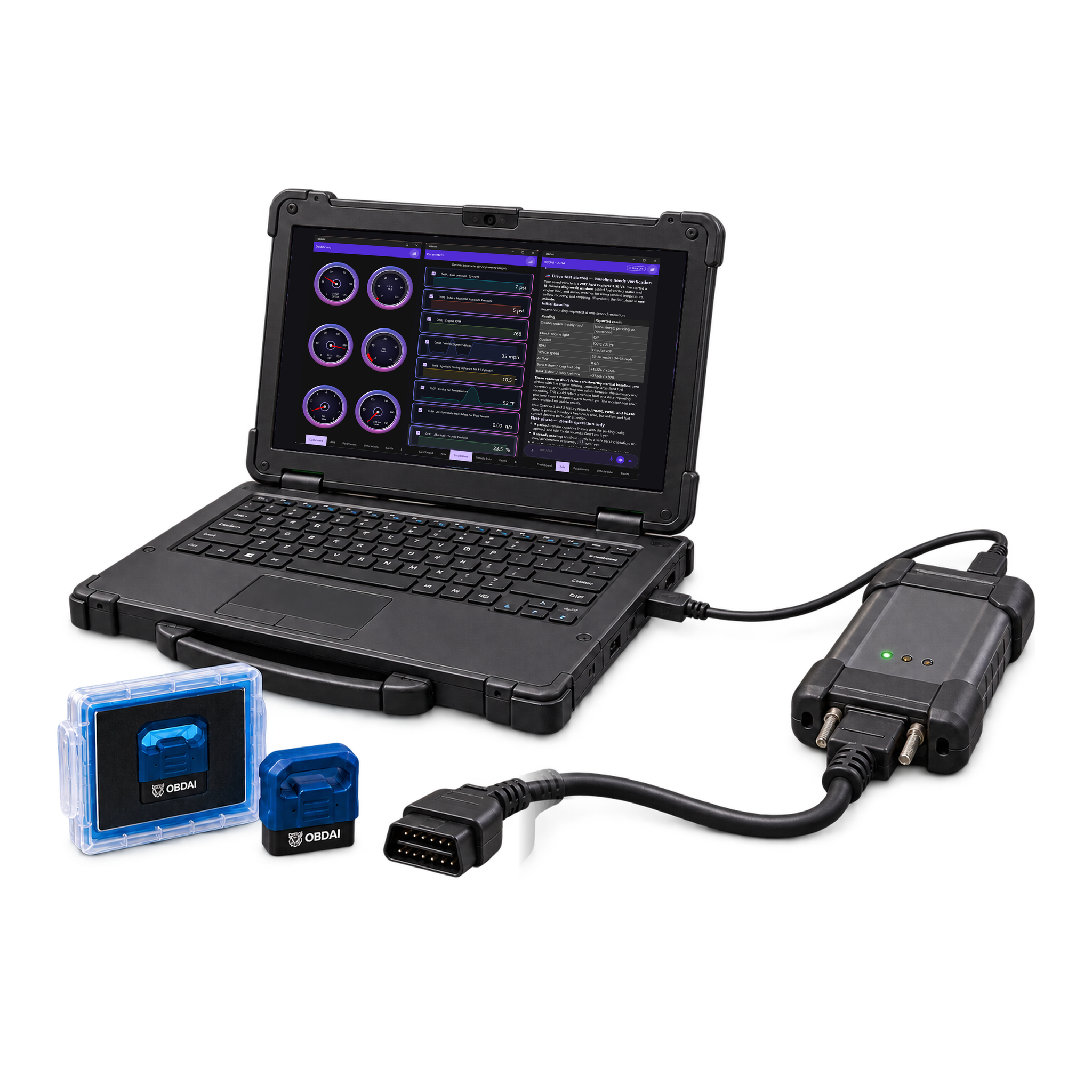
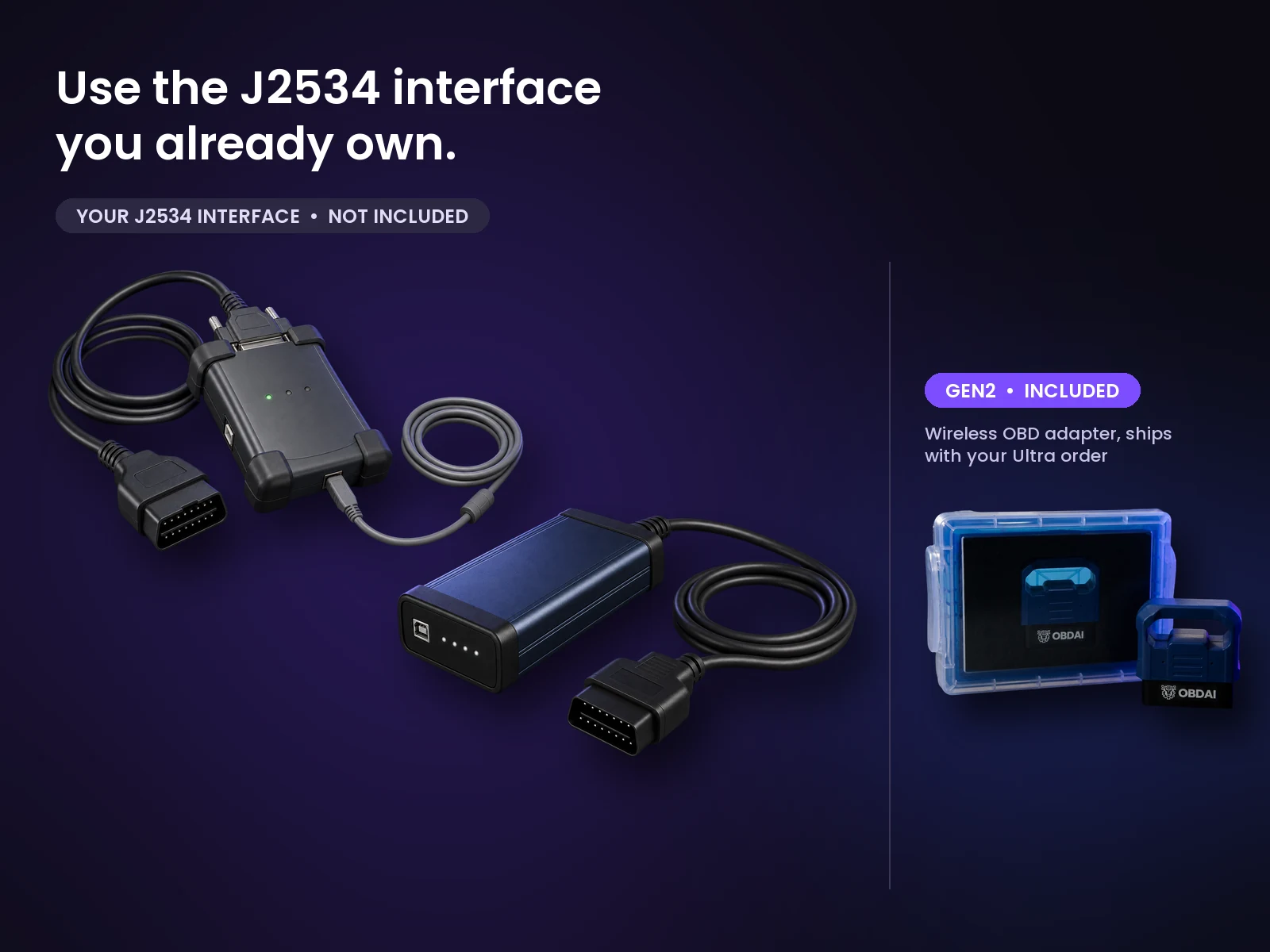
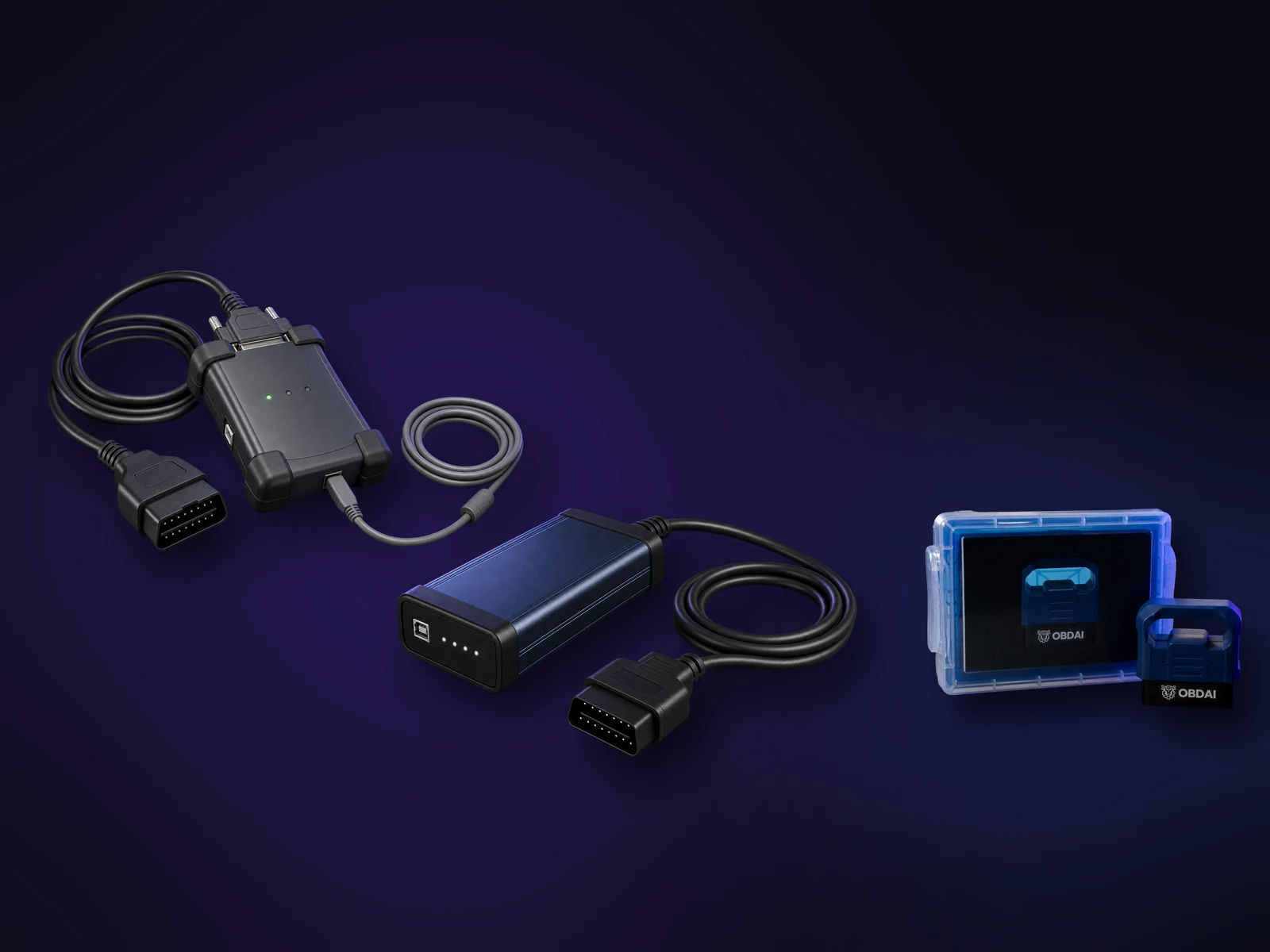
Two examples of professional J2534 pass-through interfaces a shop may already own (not included), next to the OBDAI GEN2 wireless adapter and case that ship with Ultra.
Your VCI: not included. GEN2 wireless adapter: included.

What OBDAI does with your interface

Choose J2534 in the OBDAI Windows app and you get the same full OBDAI workflow you'd get from our own adapters, running through the interface you already trust.

  • Vehicle protocols: All OBDAI-supported vehicle protocols, including J1850 PWM and VPW, ISO 9141-2, KWP2000, CAN and OBDonUDS.
  • Live data: record the readings you choose while you drive or run the engine in the bay.
  • Trouble codes: stored, pending and permanent codes from every responding module, with freeze-frame conditions where the vehicle saved them.
  • Readiness and Mode 6: monitor status and the on-board test results behind it, because a completed monitor is not the same as a passed test.
  • Vehicle information: the VIN is read from the vehicle and saved with the session.
  • ARIA reads the evidence: ask about the codes, the readiness picture, the test values or a stretch of the drive, and ARIA works from what your interface actually recorded.
  • Saved automatically: each session uploads to your account, so you can reopen it in the Pro dashboard, build a report and download a PDF for the job record.

Setup help. Contact support@obdai.app for OBDAI setup help. Get VCI drivers and firmware updates from your interface manufacturer.

OBDAI Ultra on Windows

What you see with your VCI

Real OBDAI screens showing the J2534 connection, vehicle data and ARIA on Windows. Tap any screen to see it full size.

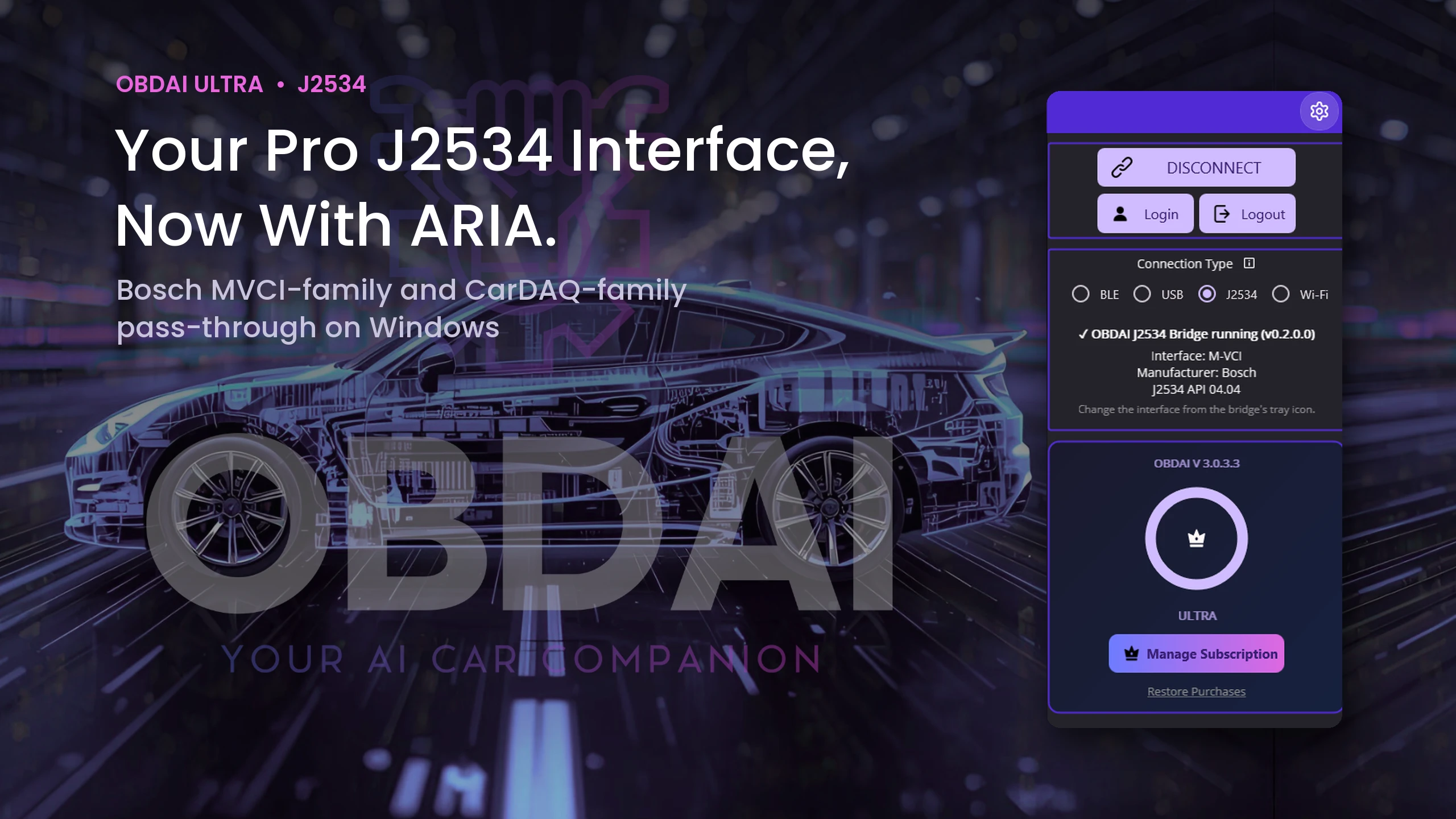
OBDAI on Windows connected through the OBDAI J2534 Bridge to a Bosch M-VCI interface, J2534 API 04.04, Ultra plan
Bridge running: Bosch M-VCI, API 04.04
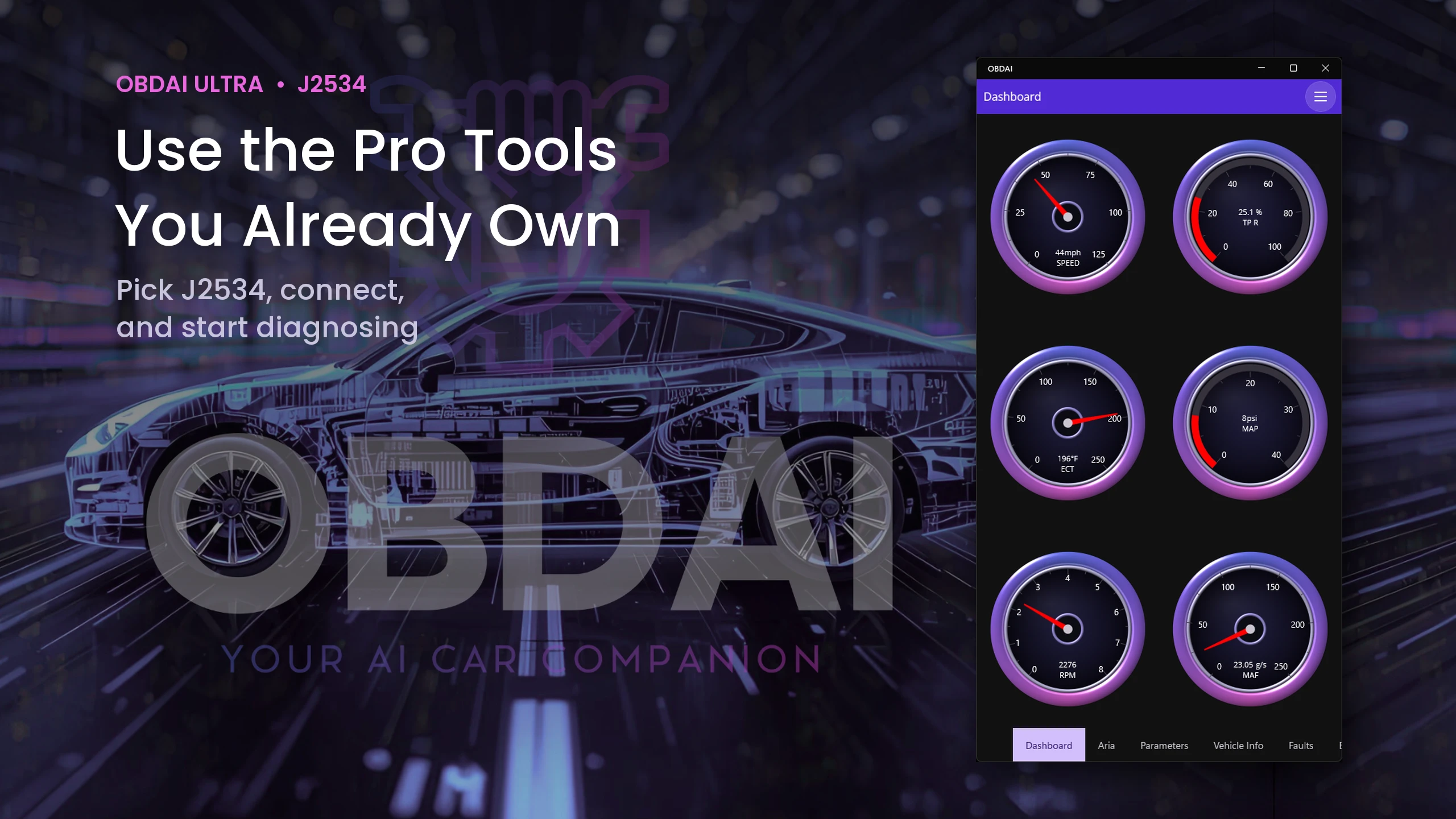
OBDAI live gauges for speed, throttle, coolant, MAP, RPM and MAF over J2534
Live gauges
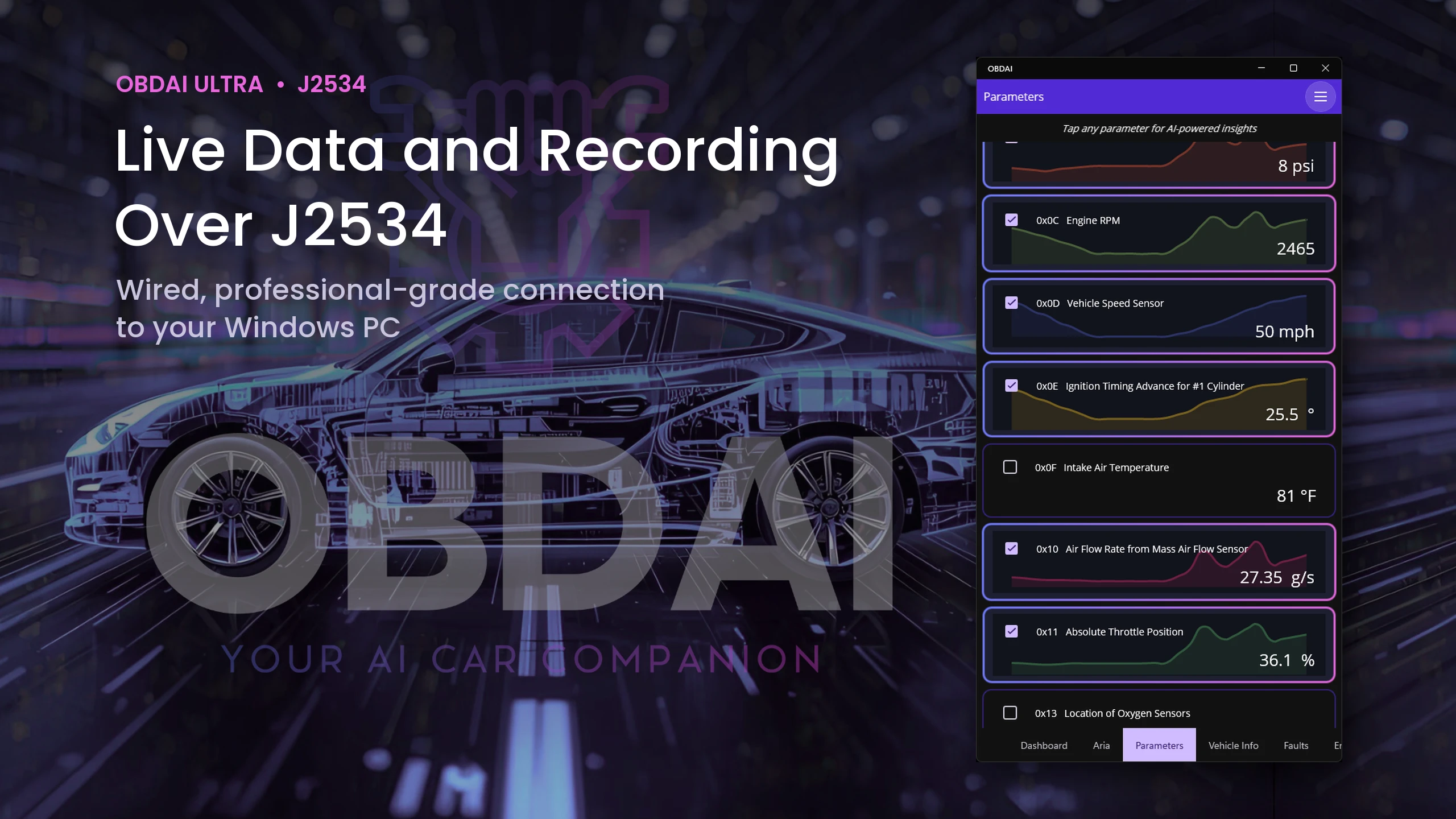
OBDAI live parameter graphs for RPM, speed, timing, MAF and throttle over J2534
Live parameter graphs
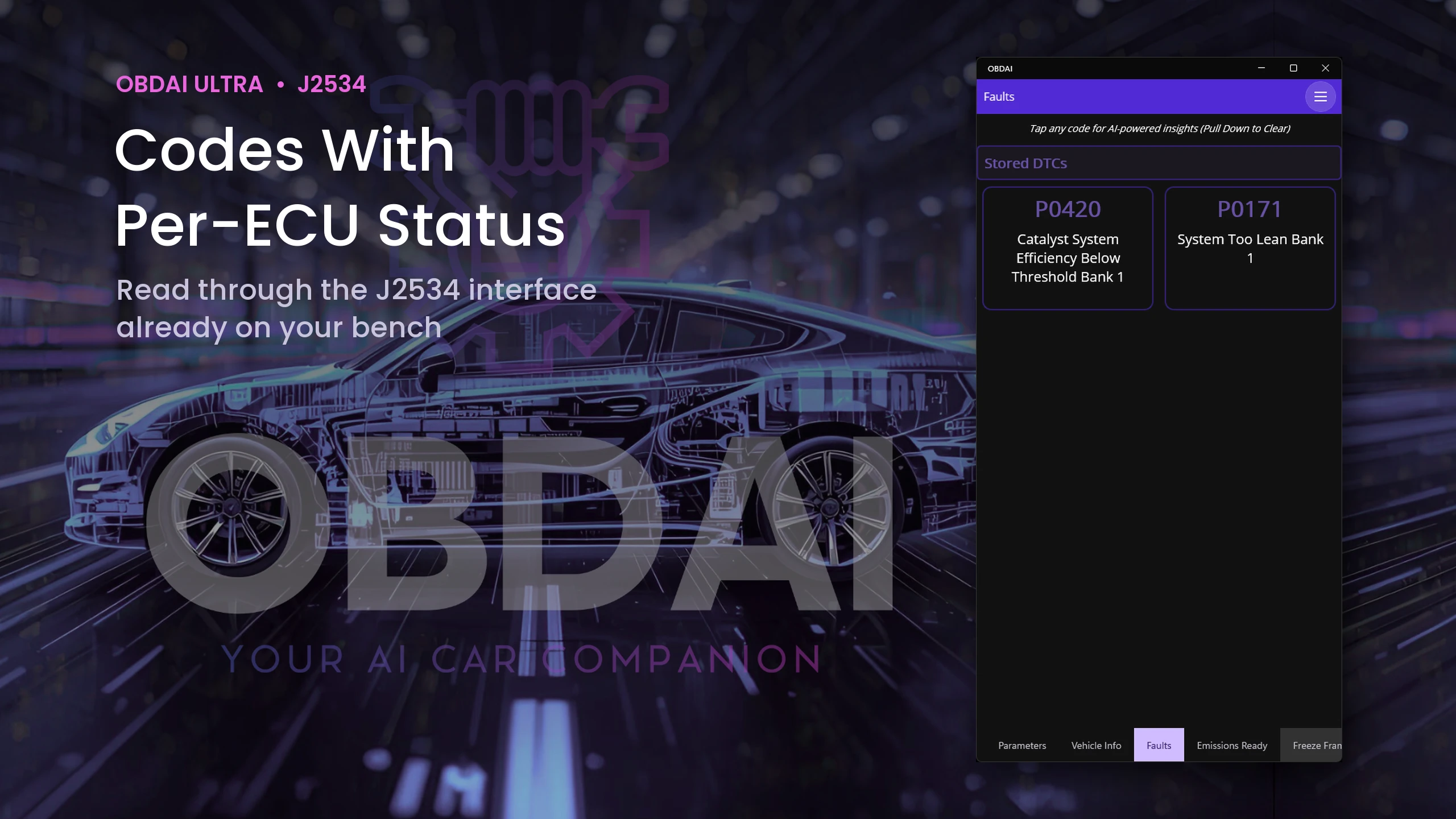
OBDAI fault list showing stored P0420 and P0171 read over J2534
Stored codes
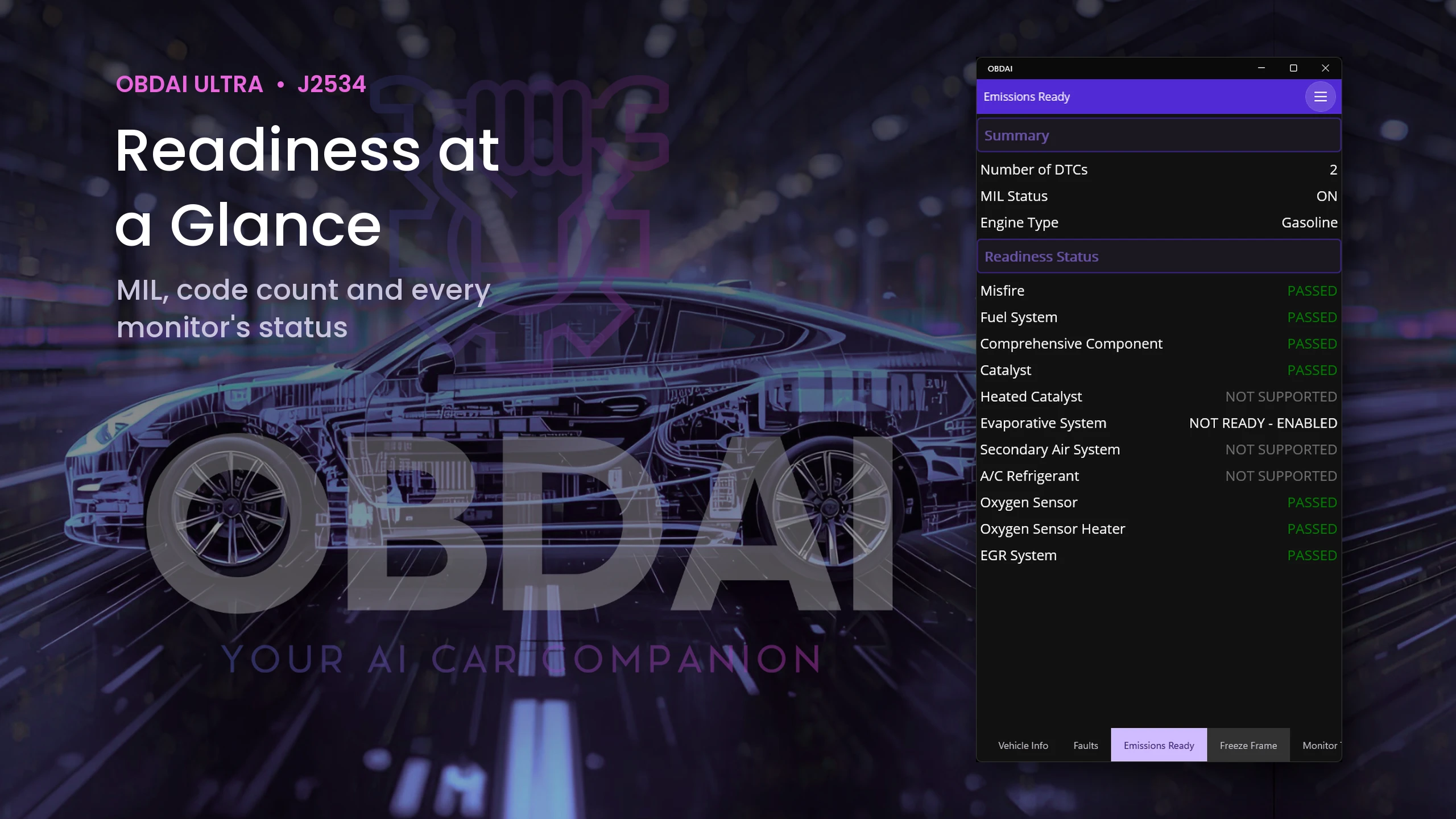
OBDAI emissions readiness: MIL on, two codes, evaporative system not ready
Emissions readiness
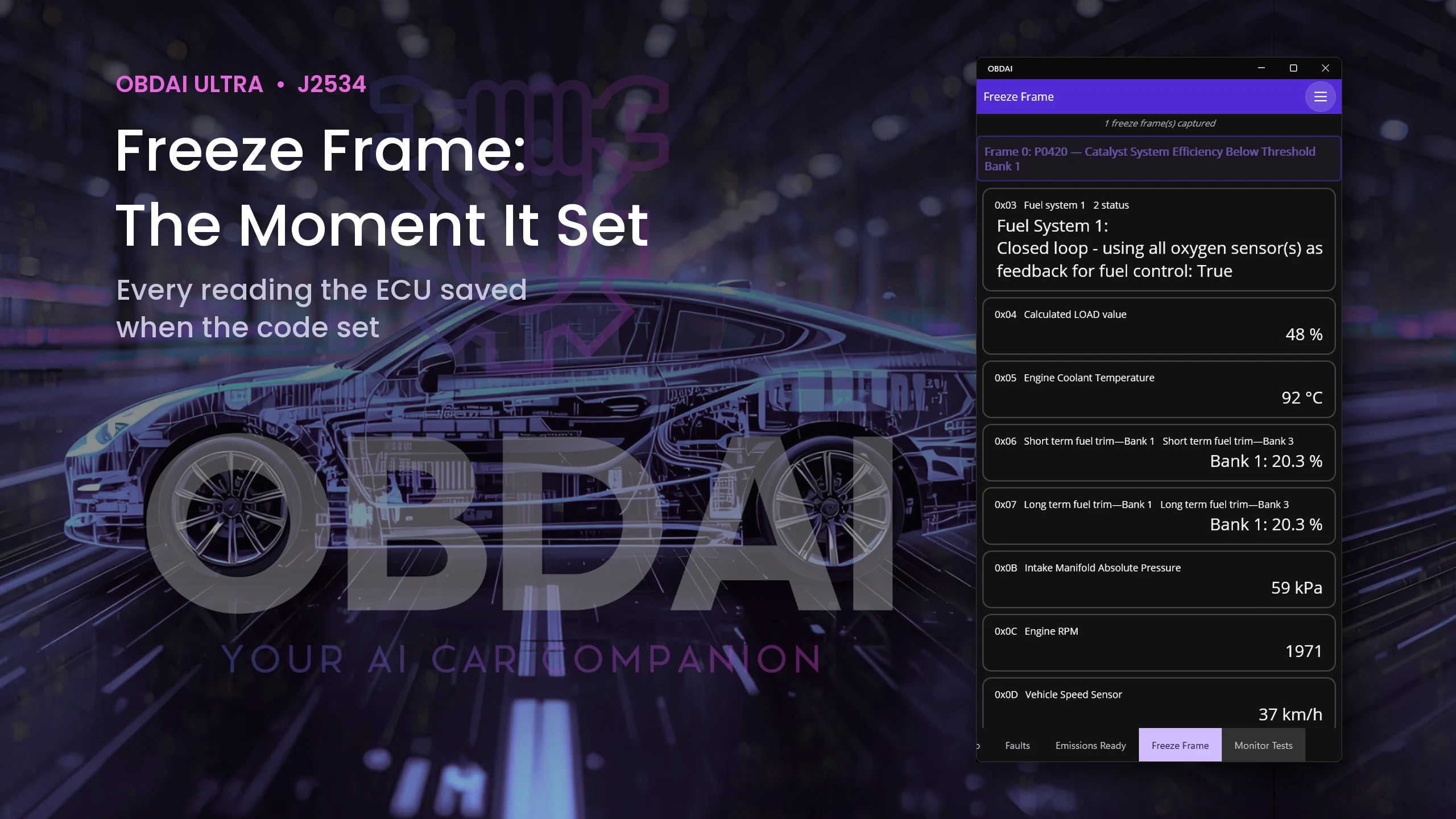
OBDAI freeze frame stored with P0420, with fuel trims, load, RPM and speed
Freeze frame
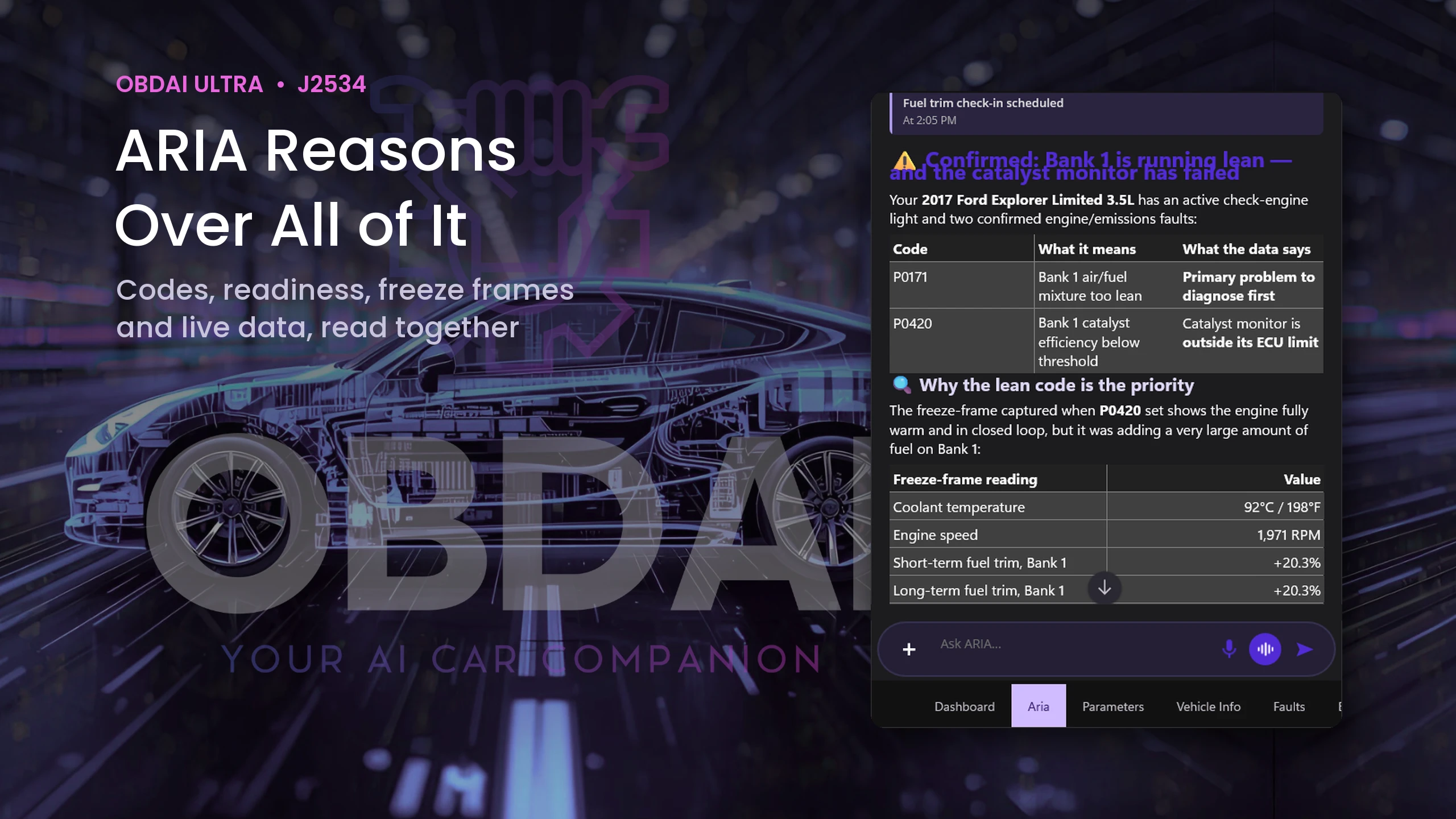
ARIA explaining that Bank 1 is running lean and the catalyst monitor has failed
ARIA's diagnosis
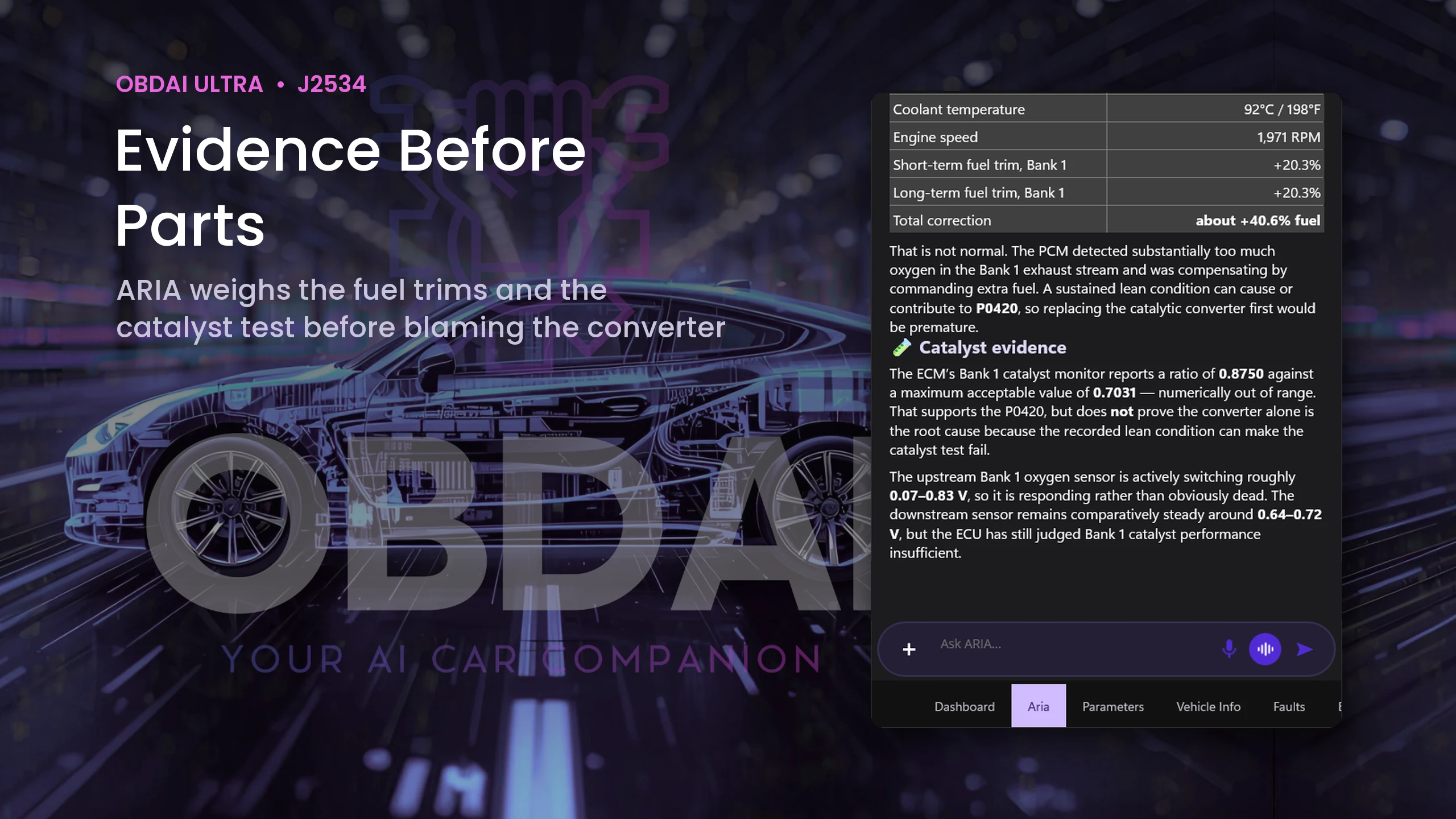
ARIA weighing the freeze-frame fuel trims and the catalyst test before blaming the converter
ARIA's evidence
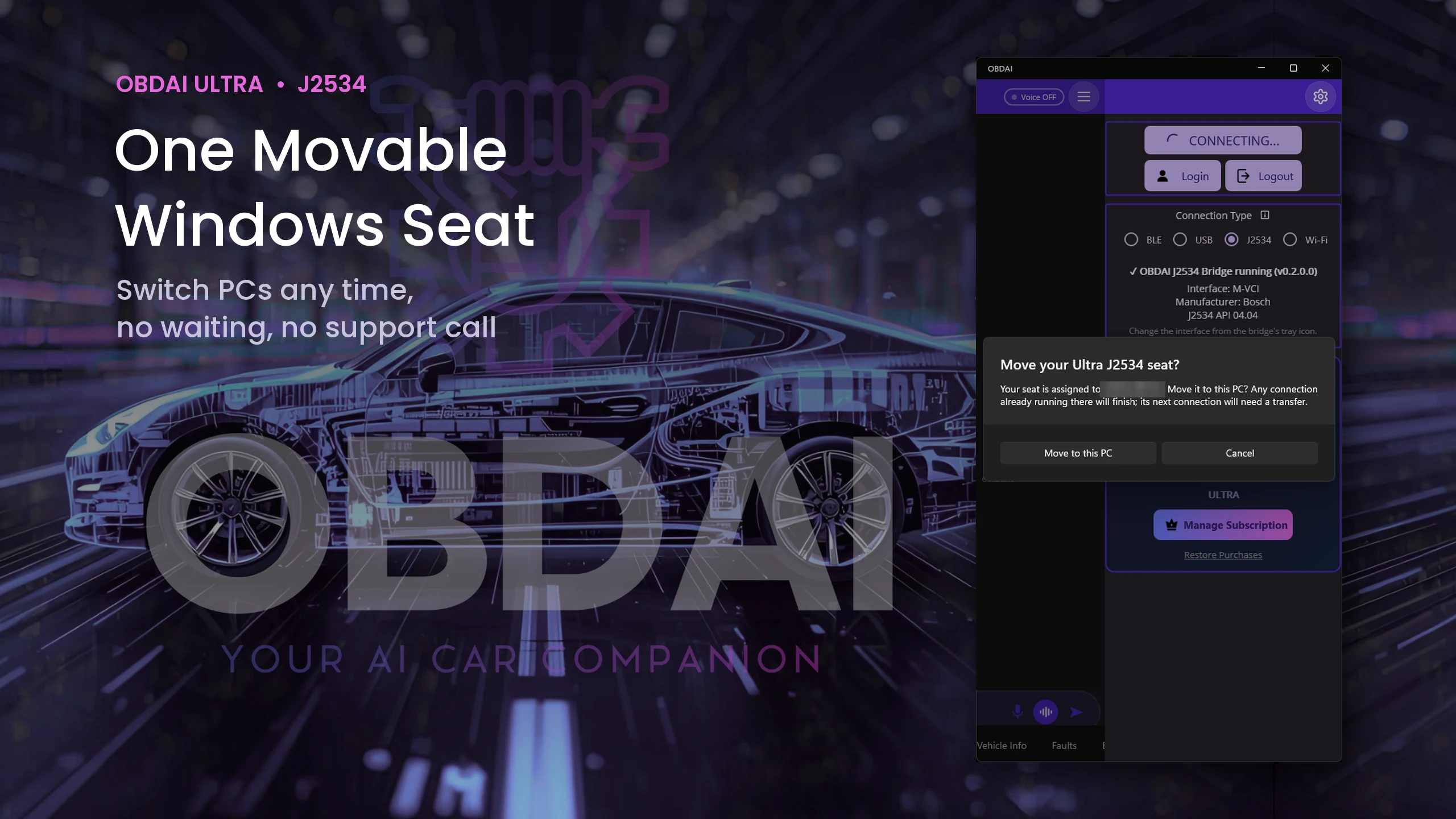
OBDAI prompt to move the Ultra J2534 seat to this PC
Moving the seat to this PC

Use your Windows J2534-compatible interface with its manufacturer's driver. The VCI and Windows PC are not included.

Up and running in minutes

Your license key arrives with your order confirmation, so you can start on your own interface the same day. Your GEN2 ships separately.

  1. Install. Install your interface manufacturer's Windows driver (links in the table above) and the official OBDAI app from the Microsoft Store, version 3.0.4 or later. If Windows shows an older version, update OBDAI in the Microsoft Store first.
  2. Activate. Sign in to the OBDAI account you will use, open the menu, choose Upgrade, then "Yes, I have a code", and enter your license key.
  3. Connect. Choose J2534 on the connect panel, pick your interface from the OBDAI J2534 Bridge tray icon in the Windows taskbar (it may be under the ^ hidden icons), plug into the vehicle and start recording.

GEN2 included. Wireless when you leave the bench.

Ultra ships the OBD BLE GEN2 for phone, tablet and road tests. Your VCI handles the Windows bench work. Use the GEN2 with the OBDAI app on iPhone, iPad, Android or Windows under the same account.

Everything in Pro is included

Ultra is not an add-on. It includes OBDAI Pro, so you keep the full Pro workflow on every device signed in to your account: ARIA diagnostics, condition watches and check-ins, the Pro dashboard, report builder with shop branding, saved reports and PDF downloads, freeze frame and Mode 6 review, and OBDonUDS on the GEN2.

See what ARIA makes of the evidence.

Real analysis from recorded vehicle sessions.

01 / ANALYZE

Understand the relationships

ARIA connects monitor results, operating conditions and parameter behavior.
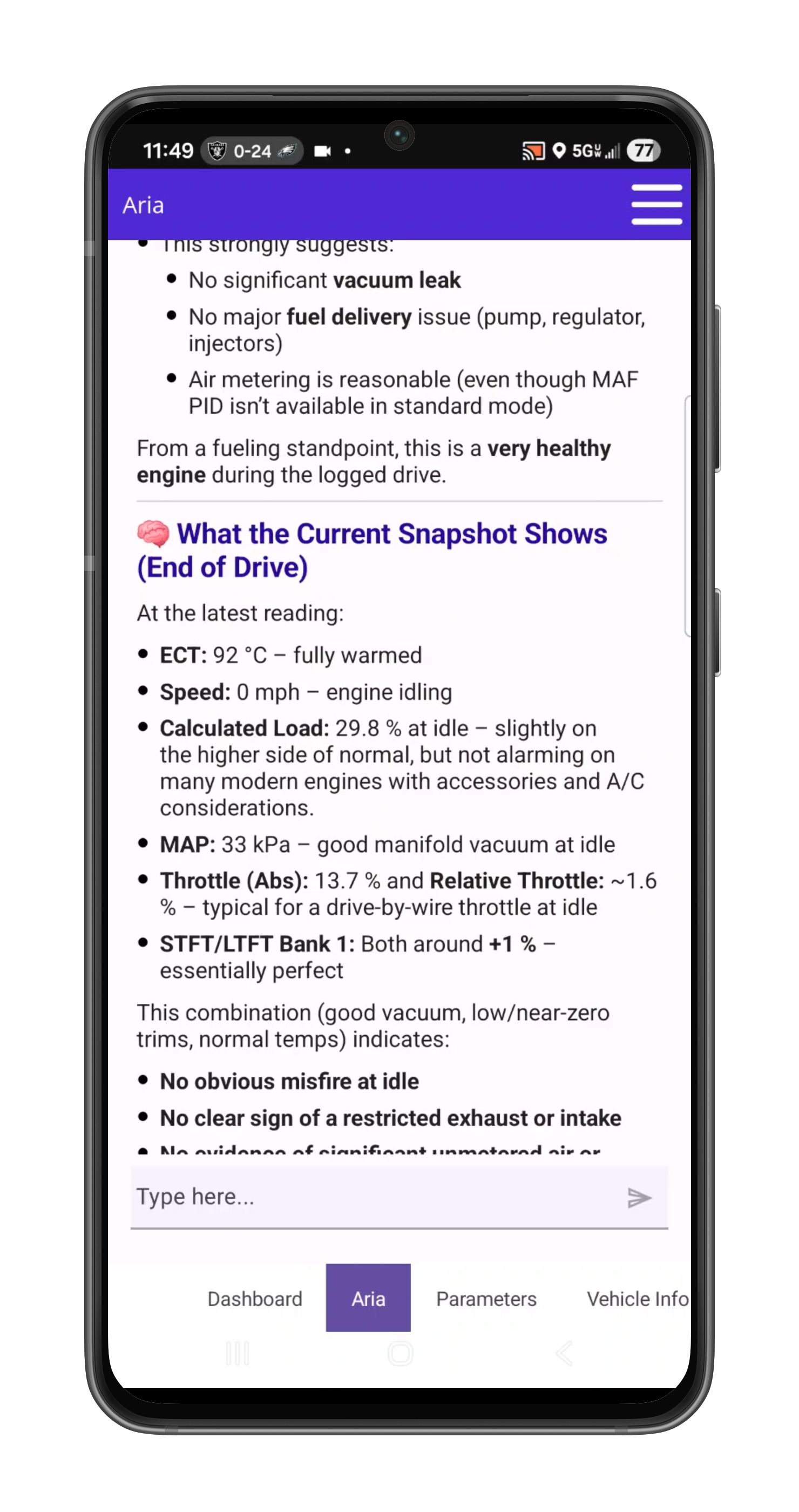
02 / COMPARE

Put changes in context

Compare sessions and check the distance from the ECU’s reported limits.

03 / EXPLAIN

Make the findings useful

Keep the analysis with the vehicle and share a clear report.

ARIA evaluates an oxygen sensor monitor change against the ECU minimum
ARIA · MODE 6 + HISTORY

A changed reading. A reasoned answer.

In this recorded example, ARIA compares 0.583 V with 0.132 V against a 0.050 V minimum. She explains the remaining margin and why a single monitor snapshot does not establish deterioration.

ARIA interprets load intake pressure temperature throttle and fuel trims together
ARIA · PARAMETER ANALYSIS

One reading gains meaning from the others.

ARIA considers coolant temperature, load, manifold pressure, throttle and fuel trims together. The explanation ties the measurements to the vehicle’s operating state.

ARIA combines historical monitor results fuel trim history and drive-cycle context
ARIA · HISTORICAL ANALYSIS

Give today’s results a history.

ARIA compares monitor trends with past fuel trims and drive-cycle context. In this example, she identifies a catalyst ratio worth watching while explaining that it remains below the failure threshold.

PRO Diagnostic Report builder on laptopSaved PRO diagnostic report viewer on laptop
PRO · REPORT BUILDER + SAVED REPORTS

Build it. Save it. Show the customer.

Continue the analysis with interactive ARIA Web Chat, choose the source session and turn the findings into an editable, shop-branded report with repair and maintenance context.

  • Unlimited editable reports with custom shop branding
  • Repair estimates and maintenance recommendations
  • Market, auction, repair and sales-history context

Also included

  • ARIA deep research10 completed research jobs per month (Pro includes 3): ARIA reads factory and primary service sources and returns a cited report.
  • Room for a bigger plan10 active watches and check-ins combined (Pro: 5).
  • More automatic follow-ups40 per connected session and 600 per account each month (Pro: 20 and 300).

Monthly allowances reset at the start of each calendar month (UTC), do not roll over and have no automatic paid overage. Existing purchased terms remain protected.

What's included and what's not

OBDAI Ultra — $499 first year, then $365/year service only
Included Not included
  • Windows J2534 connection: one transferable Windows seat per account
  • Everything in OBDAI Pro, on every device signed in to your account
  • One OBD BLE GEN2 wireless adapter, shipped
  • First year of service; renews at $365/year without replacement hardware
  • J2534 VCI (use the one you own)
  • Windows PC
  • Phone or tablet
  • Manufacturer drivers for your interface (free from the manufacturer)

Shipping and tax, if applicable, are shown separately at checkout.

Ultra questions

J2534 and your interface

Do I have to buy a VCI from OBDAI?

No. Use the Windows J2534-compatible interface you already own. OBDAI implements the J2534 04.04 and 05.00 standards across manufacturers. Install your interface manufacturer's Windows J2534 driver and select J2534 in OBDAI. Ultra includes GEN2; a J2534 VCI and Windows PC are not included.

Which vehicle protocols work over J2534?

OBDAI supports the same vehicle protocols through J2534 as through its other connections, including SAE J1850 PWM and VPW, ISO 9141-2, KWP2000, CAN and OBDonUDS.

Can Ultra program or reflash modules?

Ultra provides diagnostics and ARIA analysis. Use your OEM programming software with your VCI for module programming or reflashing.

Can I move J2534 to another Windows PC?

Ultra includes one transferable Windows J2534 seat per account. Sign in to the same account on the other PC and confirm the move. There is no transfer cooldown, and an existing live session is not interrupted.

What works offline?

Yes. Vehicle diagnostics and recording work offline after activation. ARIA and cloud services need internet.

What if my interface does not appear?

Check the manufacturer's Windows driver, device power and USB connection, then reopen the interface list from the OBDAI J2534 Bridge tray icon. If it still does not appear, contact support@obdai.app with a screenshot of the J2534 panel.

Your order

What's in the box?

One OBD BLE GEN2 wireless adapter. A VCI, PC and tablet are not included. Your license key is in your order confirmation and in My Account orders, so you can start on the VCI you already own before the GEN2 arrives.

How do I activate Ultra?

Download OBDAI and sign in to the account you will use. On Windows or Android, open the menu, choose Upgrade, then "Yes, I have a code". On iPhone or iPad, activate through obdai.app/quickstart because Apple does not allow in-app code entry. Then follow the setup steps on your Windows PC.

Can I use Ultra on more than one device?

Yes. The Pro features included with Ultra work on every device signed in to the same account: iPhone, iPad, Android and Windows. The J2534 connection uses one Windows seat per account, which you can move to another PC at any time.

How long does shipping take?

U.S. orders ship within 1–2 business days, and delivery typically takes 3–5 business days via USPS. International orders ship within 1–2 business days, and delivery typically takes 7–14 business days depending on destination. Tracking is provided. Import duties, VAT and customs fees (if any) are the customer's responsibility.

Is there a warranty or return policy?

Direct orders have a 30-day return window, and the GEN2 includes a 1-year limited warranty. Full policy details.

Plan and billing

When does my paid year begin?

Your subscription starts and charges when you buy. Activating or redeeming later gives you the remaining purchased term; it does not start another year or move your renewal date. Find the actual paid-through and renewal dates in My Account subscriptions.

Does renewal include another scanner?

No. The bundle includes a shipped GEN2 initially. Ultra renews at $365/year for service only, without replacement hardware. Pro service renewal remains $265/year. Shipping and tax, if applicable, are shown separately at checkout.

How do I upgrade website Pro to Ultra?

Use Upgrade or Downgrade on the applicable subscription in My Account. Woo checkout shows your actual credit, amount due and renewal date. It switches the existing software subscription, with no second GEN2 or second recurring subscription. Store purchases follow their own channel rules; contact support before making a second purchase.

How is deep research different from quick search?

Quick search returns a few short results inside normal ARIA questions. Deep research is a separate job: in the OBDAI app, choose Research a question, type the question with the year, make, model, engine and any readings you want checked, and confirm. ARIA reads factory and other primary service sources and returns a cited report, usually within a few minutes. Ultra includes 10 completed jobs per month, one at a time; a job that fails or returns no cited report does not count. The report cites its sources and identifies what to verify at the vehicle.

What counts as an automatic follow-up?

One optional ARIA review started by a due check-in or condition watch. Several events reviewed together count as one follow-up. Built-in check-engine-light and new-stored-code alerts do not spend the allowance. Watches and check-ins need the app open and connected.

Where can I recover my order or activation details?

Open My Account orders and the paid order details. Sign in to the intended OBDAI account before redeeming the license. Digital access and the GEN2 shipment are separate; you do not need to wait for the GEN2 delivery to start on your VCI. For an unresolved paid order, contact support@obdai.app.

How do cancellation and refunds work?

Use My Account subscriptions to manage renewal and view its current status and paid-through date. Contact support for a refund request under the applicable purchase terms.

FAQ

U.S. orders: Ship within 1–2 business days. Delivery typically takes 3–5 business days via USPS.

International orders: Ship within 1–2 business days. Delivery typically takes 7–14 business days depending on destination. Tracking is provided.

Import duties, VAT, and customs fees (if any) are the customer's responsibility.

Direct orders (obdai.app/shop): 30-day return window. Hardware includes a 1-year limited warranty.

Amazon orders: Follow Amazon's return policy.

Full policy details →

App-store purchases: Manage billing and subscription changes through the Apple, Google, or Microsoft account used to purchase.

Prepaid licenses: Amazon and direct OBDAI purchases before June 6, 2026 provide one year from activation (365 days), do not auto-renew, and receive expiration reminders.

Direct OBDAI subscriptions purchased on or after June 6, 2026: Manage recurring billing at My Account → Subscriptions with your OBDAI store login and password, separate from your app login.

A bundle includes hardware. See your selected product for the included plan.

Find your purchase type and where to manage it →

App-store purchases: Manage billing and subscription changes through the Apple, Google, or Microsoft account used to purchase.

Prepaid licenses: Amazon and direct OBDAI purchases before June 6, 2026 provide one year from activation (365 days), do not auto-renew, and receive expiration reminders.

Direct OBDAI subscriptions purchased on or after June 6, 2026: Manage recurring billing at My Account → Subscriptions with your OBDAI store login and password, separate from your app login.

Canceling a recurring subscription stops future renewal; access continues through the paid term. Prepaid licenses have no automatic renewal to cancel.

Find your purchase type and where to manage it →

No. An active bundle entitlement covers its included plan; you do not need an additional app-store subscription for the same coverage.

Activating a license does not cancel existing billing. Check your active coverage and receipts before canceling any recurring subscription you no longer want through its billing store. A prepaid license does not itself create recurring charges.

Find your purchase type and where to manage it →

OBDAI works with most OBD-equipped passenger vehicles, but exact coverage depends on market, model year, protocol, and the data each vehicle exposes. Some 2025 and 2026 vehicles already use SAE J1979-2 OBDonUDS; OBDAI reads it with either GEN2 with PRO, or a Windows J2534-compatible interface with Ultra.

Check the full compatibility guide →

Your Premium bundle includes:

• GEN2 wireless OBD-II adapter

Ultra orders also ship the GEN2 wireless OBD-II adapter. Your J2534 interface and Windows PC are not included.

Your license code is emailed immediately after purchase — so you can start using Premium right away, even before the hardware arrives. Amazon orders also include a physical license sticker on the packaging.

For setup instructions, see our Getting Started guide.

Three steps:

1. Download OBDAI and sign in
2. On Android or Windows, open the menu, choose Upgrade, then “Yes, I have a code”
3. On iPhone or iPad, activate through obdai.app/quickstart because Apple does not allow in-app code entry

Your Premium access activates immediately across all your devices.

Full setup guide →

Yes — all of them. Sign in with the same account on your phone, tablet, and laptop. Premium syncs automatically across iOS, Android, and Windows.

One purchase. Every device you own.

Yes. The license code can be activated by anyone on their own device. Just give them the code — they redeem it, they get Premium.

This makes OBDAI bundles ideal for gifts, or for businesses purchasing codes for employees or fleet vehicles.

A Windows 10 or 11 (64-bit) PC, the OBDAI app, a J2534 interface with its manufacturer's Windows driver, and your Ultra license key.

Set up OBDAI Ultra with your J2534 interface →

Yes. Vehicle diagnostics and recording work offline after activation. ARIA and cloud services need internet.

Yes. Sign in to the same OBDAI account on the other PC and confirm the move. You can switch PCs whenever you need to; an active diagnostic session keeps running.

Use your J2534 interface with OBDAI on Windows. On iPhone, iPad or Android, use the included GEN2 adapter with the Pro features included in Ultra.

Some upcoming manufacturer-specific parameters will require a compatible J2534 interface. Others will also be available through GEN2. A suitable J2534 interface can access the additional vehicle networks those parameters use.

Ultra provides diagnostics and ARIA analysis. Use your OEM programming software with your VCI for module programming or reflashing.

OBDAI Ultra works with Windows J2534-compatible interfaces. OBDAI implements the J2534 04.04 and 05.00 standards, so compatibility extends across manufacturers.

Examples include Bosch Mastertech, CarDAQ, GM MDI and MDI 2, Ford VCM II/3 and VCMM, Honda/Acura MVCI, Mongoose and Toyota Techstream Lite, Snap-on Pass Thru Pro, Matco MDMaxBox/MaxSync, DENSO, DG VSI, Autel MaxiFlash, LAUNCH SmartLink and TOPDON RLink. Your interface does not need to be on this list: J2534 compatibility is what matters. Install your interface manufacturer's Windows J2534 driver and select J2534 in OBDAI.

Use the J2534 interface you already own. Ultra also includes a shipped GEN2 wireless adapter for your phone or tablet. A J2534 VCI and Windows PC are not included.

Testimonials

“Great tool! Just like other tools you have to guide the process for the program to assist you.”
Hostile Auto Repair · Apple App Store
“App is well thought out, graphically pleasing, and easy to use by non-automotively inclined users. I recommend this app for all cars.”
Bryan Stewart · Google Play
“The instructions are crystal clear, and you don’t need to be a pro to figure it out.”
“Know Your Car!!!” reviewer · Apple App Store

Social Media Posts

Stay connected with our latest posts